TL;DR: One blog post should produce at least 13 pieces of content: 8 social posts, a carousel, a newsletter excerpt, a video script, and an audio clip. This workflow takes about 90 minutes. The bottleneck in content creation was never ideas or writing — it's the production work of reformatting the same thinking across different platforms. AI removes that bottleneck. Here is the exact 7-step process.
The One-and-Done Problem
You spend three hours researching, outlining, and writing a blog post. You publish it. You share a link on LinkedIn. Then you move on to the next post, and the one you just published starts collecting dust.
That post contained five or six ideas worth sharing independently, a narrative arc that works as a short video, a contrarian angle that would start a conversation on X, and enough substance for a newsletter segment your subscribers would actually read. But reformatting all of that for different platforms takes time you do not have. So you skip it, and three hours of work produces one piece of content that reaches one audience in one format.
The problem is not that you lack ideas. You already did the thinking. The problem is the production overhead of turning one set of ideas into the different shapes each platform requires. Writing a LinkedIn post is different from writing a tweet is different from scripting a 60-second video. Each format has its own structure, length, and tone. Doing all of that manually after every blog post is a second job.
AI compresses that production work from hours to minutes. Not by generating new ideas, but by reformatting the ideas you already developed into the specific structures each platform rewards. The complete guide to AI for content marketing covers the full content creation pipeline from topic research through distribution. This article zooms in on one specific piece of that pipeline: what happens after you hit publish, and how to stop leaving 90% of your content's value on the table.
Here is what one blog post produces when you run this workflow.
Step 1: Write the Source Post (30 Minutes)
The source post is the foundation. If it is thin, everything downstream will be thin too.
Use Perplexity for research. Before you write a word, paste your topic into Perplexity and ask it to map the landscape:
Prompt: "What are the most common recommendations for [your topic]? What do most articles on this subject get wrong or leave out? Cite sources."
The citations give you a factual base and show you where the existing coverage has gaps you can fill with your own experience.
Then draft in Claude. Paste your Perplexity research along with your outline and use this prompt structure:
Prompt: "I'm writing a blog post about [topic]. Here is my research: [paste Perplexity output]. Here is my outline: [paste your H2 headings]. Write a 1,500-word first draft. Tone: direct and practical, written for [audience]. Do not use filler phrases. Include specific examples. Take a clear position rather than presenting both sides neutrally."
The draft is a starting point. Spend 10 to 15 minutes editing for your voice, adding personal experience, and removing anything generic. The source post should be at least 1,500 words on a specific, opinionated topic. A post titled "5 Tips for Better Productivity" will not repurpose well because each tip is too vague to stand alone. A post titled "Why I Stopped Batching Content (And What I Do Instead)" gives you arguments, examples, and a clear point of view that break apart into distinct social posts.
This step takes 30 minutes and is the only one that resists significant compression. The thinking is the part AI cannot shortcut.
Step 2: Extract Social Posts (10 Minutes)
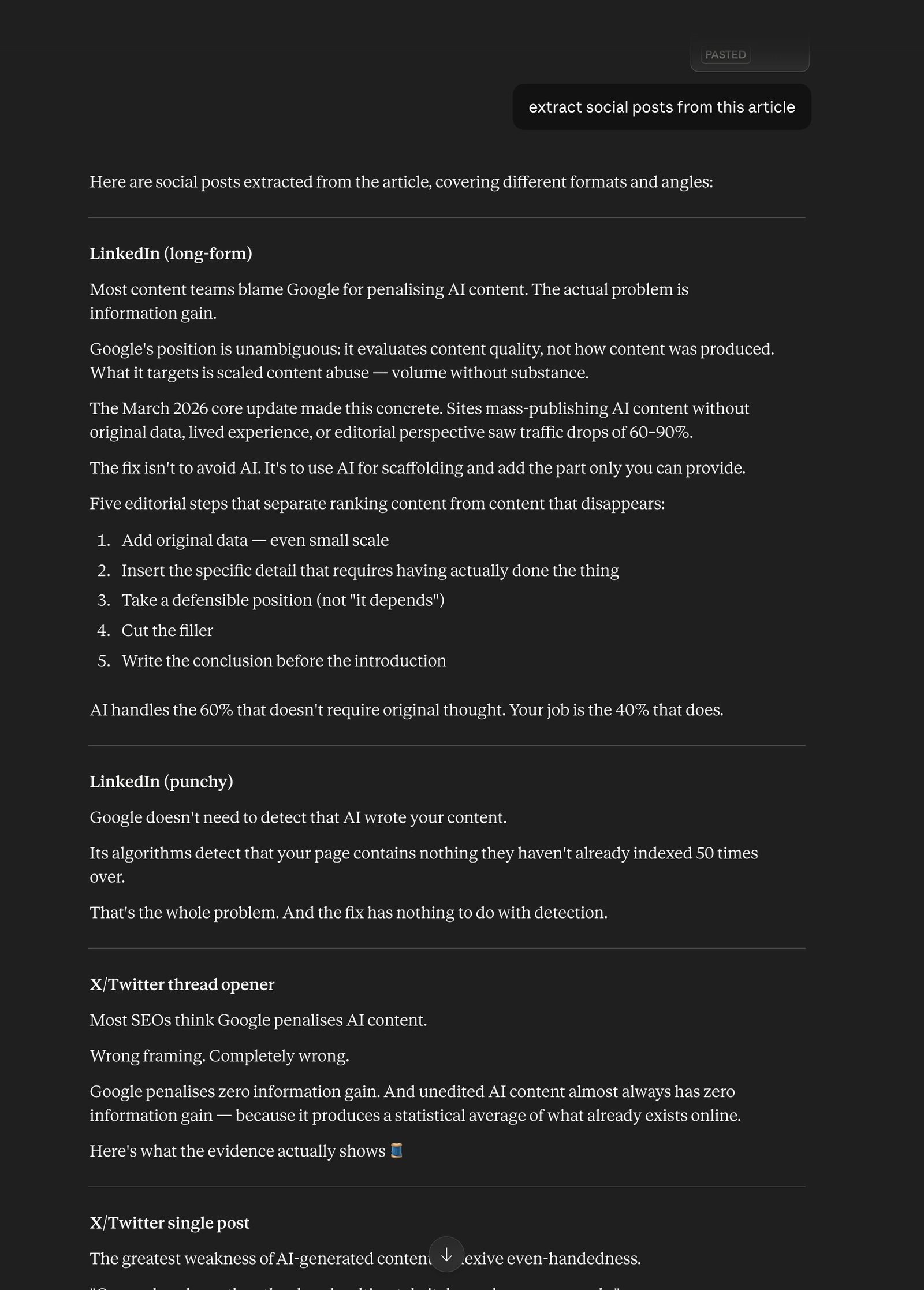
Open Claude and paste the full text of your published post. Ask it to extract standalone social content, not pull quotes.
Prompt: "Here is a blog post I just published: [paste full text]. Extract the following, each as a standalone piece that makes sense without reading the original:
- 3 LinkedIn posts: one built around the single strongest insight, one around a contrarian or surprising claim, and one around the most actionable practical tip. Each 150–250 words with a hook in the first line.
- 3 X/Twitter posts: punchy, under 280 characters each, each conveying one complete idea.
- 2 Instagram captions: conversational, 80–120 words, each ending with a question to prompt comments. Do not use the phrase 'in my latest blog post.' Each piece should feel like it was written natively for that platform."
Review the output and edit for your voice. The LinkedIn posts usually need the most adjustment because Claude defaults to a slightly formal register that reads as corporate on the platform. Shorten the sentences. Cut any opening that starts with a broad statement about the industry. Start with the specific claim or observation instead.
The X posts are usually close to ready out of the box. Check that each one contains a complete thought rather than a cliffhanger that only makes sense if someone clicks through.
Time: 10 minutes including editing.
Step 3: Create a Carousel (15 Minutes)
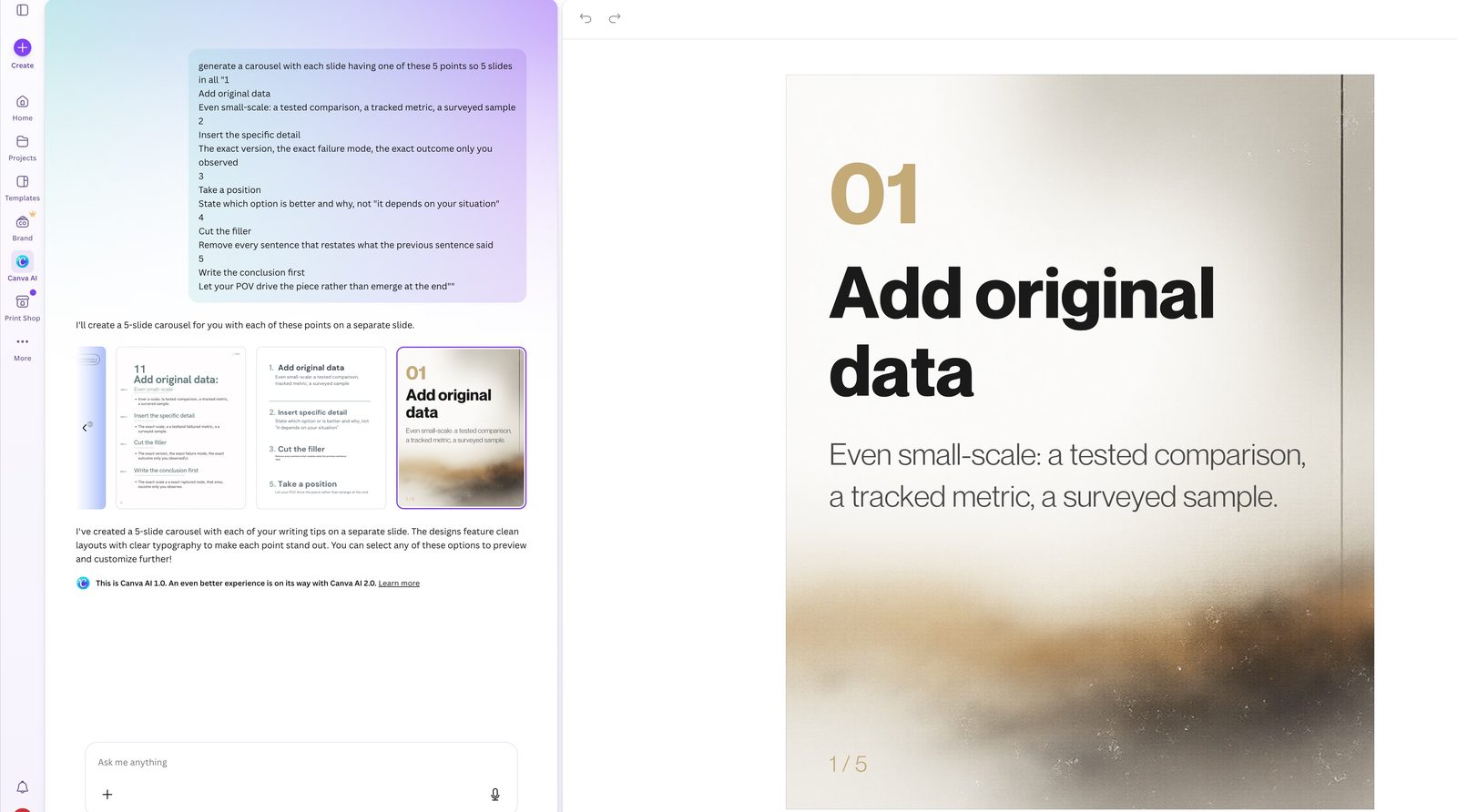
Pull the five strongest standalone points from your post. Each point should make sense in a single sentence with a brief supporting explanation underneath.
Open Canva and use a saved brand template for carousels. If you do not have one yet, create one during your first run of this workflow: pick a carousel template, apply your brand colours and fonts, and save it. Every future carousel starts from that template, and the design decisions are already made.
Structure the slides like this: Slide 1 is the title and hook (the post's main argument in one sentence). Slides 2 through 6 each present one point with a one-line explanation. Slide 7 is a call to action (follow, save, or visit the link in bio).
Use Canva's Magic Design to suggest layouts if you are not confident in your design instincts. Drop in your points, adjust spacing, export as PNG.
The template is what makes this fast. Without a saved template, carousel creation takes 30 to 45 minutes. With one, the design work is already handled and you are swapping in new text.
Time: 15 minutes.
Step 4: Write a Newsletter Excerpt (10 Minutes)
The newsletter version of your blog post is not a summary. Readers who subscribe to your newsletter and also follow your blog will notice if you just compressed the post into fewer words. The newsletter needs to offer something the post did not: a personal reaction, a related observation, or a question the post deliberately left unanswered.
Prompt: "Here is a blog post I published this week: [paste full text]. Write a 200-word newsletter section that approaches the same topic from a different angle. Options: a personal observation about why I wrote this piece, a question the post raises but does not answer, or a contrarian response to the post's own argument. End with a one-sentence link to the full post. Tone: personal and direct, as if writing to someone I've been emailing for months."
Edit the output so it sounds like you, not like a writing assistant summarising your work. The newsletter is where your audience expects the version of you that does not appear in polished blog posts. Plan to rewrite at least half of what Claude produces here.
Time: 10 minutes.
Step 5: Generate a Video Script (10 Minutes)
A 60-second video script follows a rigid structure: hook, argument, call to action. The constraint is helpful because it forces you to identify the single most compelling thread in your post and cut everything else.
Prompt: "Compress the main argument of this blog post into a 60-second video script: [paste full text]. Structure: Hook (first 10 seconds, one provocative sentence that stops someone from scrolling). 3 key points (40 seconds, each point in 2 sentences or fewer). CTA (final 10 seconds, tell the viewer what to do next). Write it as spoken words, not written text. Use short sentences. No jargon."
The script becomes a Reel, TikTok, or YouTube Short. You can record it yourself talking to camera, or use it as a voiceover for screen recordings and B-roll. If you are not comfortable on camera, step 6 gives you another option.
Edit the hook before anything else. The AI-generated hook is usually functional but not arresting. Replace it with the single most surprising or specific detail from your post. "I tracked my content output for 4 weeks and found that 92% of it disappeared after day one" stops more thumbs than "Want to get more from your blog posts?"
Time: 10 minutes.
Step 6: Create an Audio Summary (5 Minutes)
Take the video script from step 5 and paste it into ElevenLabs. Select a voice that fits your brand tone. Generate a 60-second audio clip.
This audio serves three purposes: as a voiceover layered onto video footage for the Reel or Short from step 5, as an intro clip for a podcast episode that expands on the post's topic, or as an audio snippet embedded in your newsletter for subscribers who prefer listening to reading.
The ElevenLabs free tier handles this step without issue. You get enough monthly characters for several 60-second clips before needing a paid plan.
Time: 5 minutes.
Step 7: Schedule Everything (10 Minutes)
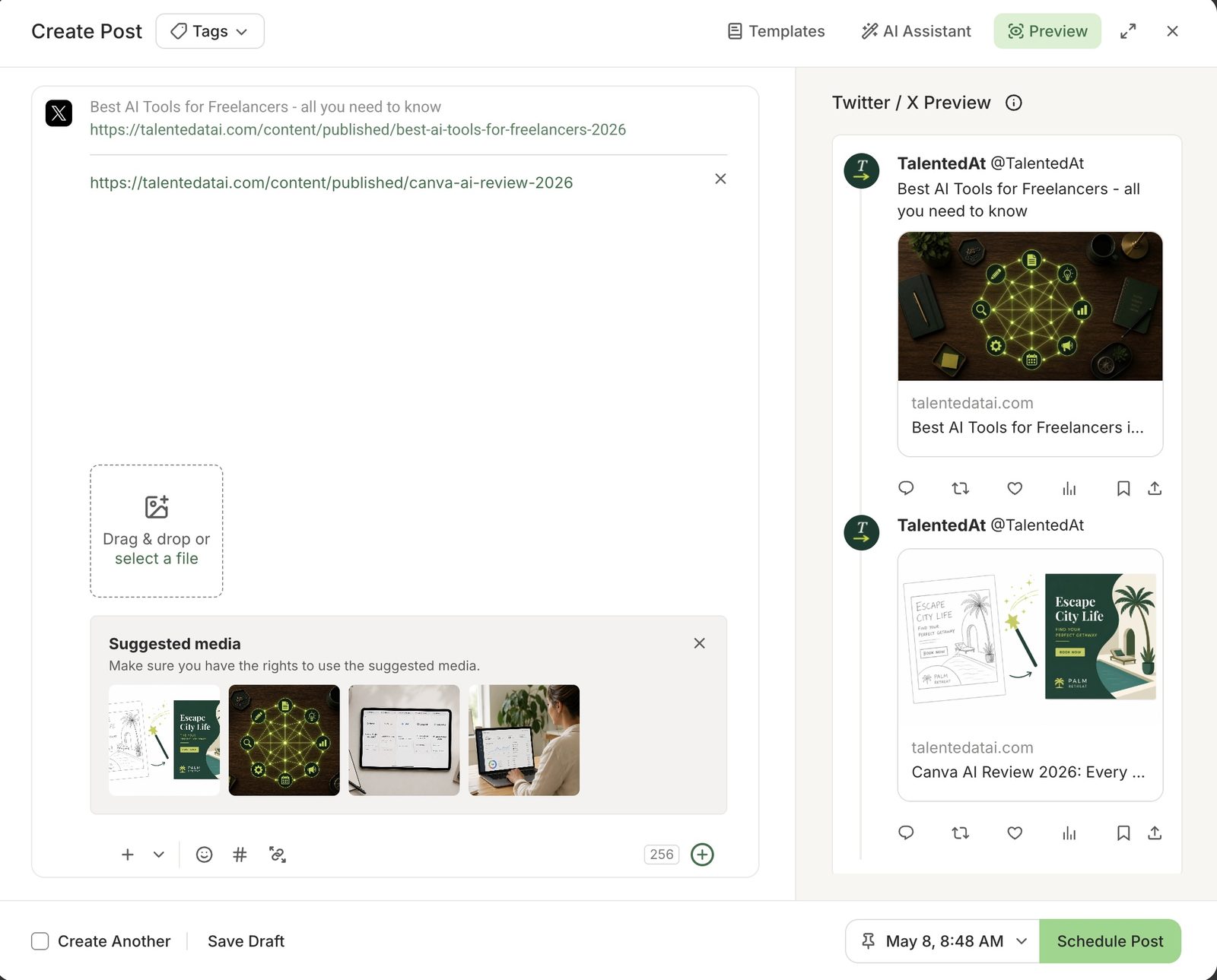
Load all of your content into Buffer. A scheduling pattern that distributes your content across the week without overwhelming any single platform:
Monday: LinkedIn post #1 (strongest insight). Tuesday: X post #1. Wednesday: LinkedIn post #2 (contrarian take) plus carousel on Instagram. Thursday: X post #2. Friday: LinkedIn post #3 (practical tip) plus X post #3.
The newsletter excerpt goes into your next scheduled send. The video script and audio clip go to whichever short-form video platform you are currently growing.
Spend the last few minutes previewing each post in context. Check that the LinkedIn posts do not all open the same way. Confirm the X posts read well without the context of the original article. Make sure the carousel's first slide has a hook strong enough to stop someone mid-scroll.
Time: 10 minutes.
What AI Handles vs. What You Still Own
AI handles the reformatting, restructuring, and compression. It takes your 1,500 words and reshapes them into the distinct formats each platform requires. For the social post extraction, the audio generation, and the scheduling step, AI output is close to final with light editing.
But three areas still need your judgment, and skipping the human layer here will produce content that feels hollow.
The source post's argument. AI can draft prose from your outline, but it cannot decide what you believe or which angle matters most to your audience. The central claim of your blog post comes from your experience, your reading, your position on the topic. If you let AI generate the argument itself, every downstream piece inherits that vagueness. The source post is where you do the intellectual work. Everything else is distribution of that work.
The newsletter angle. The newsletter excerpt is the step where AI output needs the most rewriting. Claude will default to summarising the post when what you actually want is a reaction to the post. The newsletter is your most personal channel. Your subscribers chose to give you their email address, and they can tell when the voice shifts from yours to a model's. Budget time to rewrite 50% or more of the AI draft for this step.
The video hook. AI-generated hooks are competent but safe. The opening line of a 60-second video determines whether anyone watches the other 55 seconds. Write the hook yourself. Use the most specific, concrete detail from your post. Specificity stops the scroll. Generality does not.
Everything else in this workflow benefits from AI doing the production work. The social posts need editing, not rewriting. The carousel is a design task that Canva's templates handle. The audio is a conversion task that ElevenLabs handles. The scheduling is logistics that Buffer handles. Your time and attention go to the three places where your perspective cannot be replaced by a prompt.
The Compounding Effect
Run this workflow once and you have 13 pieces of content from one post. Run it every week for a month and you have 52 pieces of content from four posts.
That is not a theoretical number. Four blog posts, each taking 90 minutes to repurpose, means six hours of total production time across a month. Six hours for a month of consistent, cross-platform content that all traces back to ideas you already developed and believe in.
The compounding goes beyond volume. Each blog post you repurpose teaches you which formats resonate on which platforms. The LinkedIn post that gets 10x the engagement of the other two tells you something about what your audience responds to. The video hook that stops more scrollers reveals which angles land in short form versus long form. By month two, you are not just producing more content. You are producing smarter content because each cycle generates data about what works.
The math is worth sitting with for a moment. Most content creators publish 2 to 3 posts per week and promote each once. Running this workflow on even one of those posts per week gives you more distribution than the other two posts combined, from ideas you have already researched and written.
Start this week. Take your most recent blog post. It does not need to be your best work. It needs to have a specific argument and at least five distinct points or observations. Open Claude, run steps 2 through 5, and see what comes out. The first run will be rough and slow. The second will be faster because you will reuse the same prompts with minor adjustments. By the fourth, the workflow will feel like a system rather than an experiment.
If your content stack is not set up yet, the freelancer AI tool guide covers the full set of tools you need and what each one costs. You do not need all of them to start. You need Claude, a scheduling tool, and the willingness to stop treating every blog post as a one-time event.
Related guides:
- How to Use AI for Content Marketing in 2026
- ChatGPT vs Claude 2026
- Perplexity AI Review 2026
- Canva AI Review 2026
- ElevenLabs Review 2026