TL;DR: We gave four AI website builders the exact same brief — a portfolio site for a freelance photographer — and the results were wildly uneven. Wix ADI was the fastest but filled the site with kitchen stock photos and a colour palette nobody asked for. Squarespace AI looked polished but wouldn't let us change the layout. Framer AI nailed the structure and copy but left the image areas empty — waiting for real content instead of guessing wrong. And Bolt.new failed on the first attempt, then produced the best-looking result of all four on the second try. The tool everyone recommends isn't the tool that produces the best website. Here's what actually happened.
How we tested this: Every tool in this article was tested on its free tier using the same creative brief: "A portfolio site for a freelance photographer. Clean, minimal design. Three pages: Home, Portfolio, Contact. Home page has a short intro and a featured image. Portfolio page is a grid of photos. Contact page has a simple form. No e-commerce. Mobile friendly." We evaluated each result on design quality, customisability, speed to publish, SEO setup, and cost to go live with a custom domain. No tool received preferential treatment.
The Brief
Here is the exact prompt we used, pasted identically into each tool:
"A portfolio site for a freelance photographer. Clean, minimal design. Three pages: Home, Portfolio, Contact. Home page has a short intro and a featured image. Portfolio page is a grid of photos. Contact page has a simple form. No e-commerce. Mobile friendly."
Simple, specific, and deliberately free of style prescriptions beyond "clean" and "minimal." No colour preferences. No font requests. No named photographer. We wanted to see what creative decisions each tool would make on its own.
Four tools. Same brief. Same expectations. Here's what came back.
Wix ADI: Fast, Familiar, and Forgettable
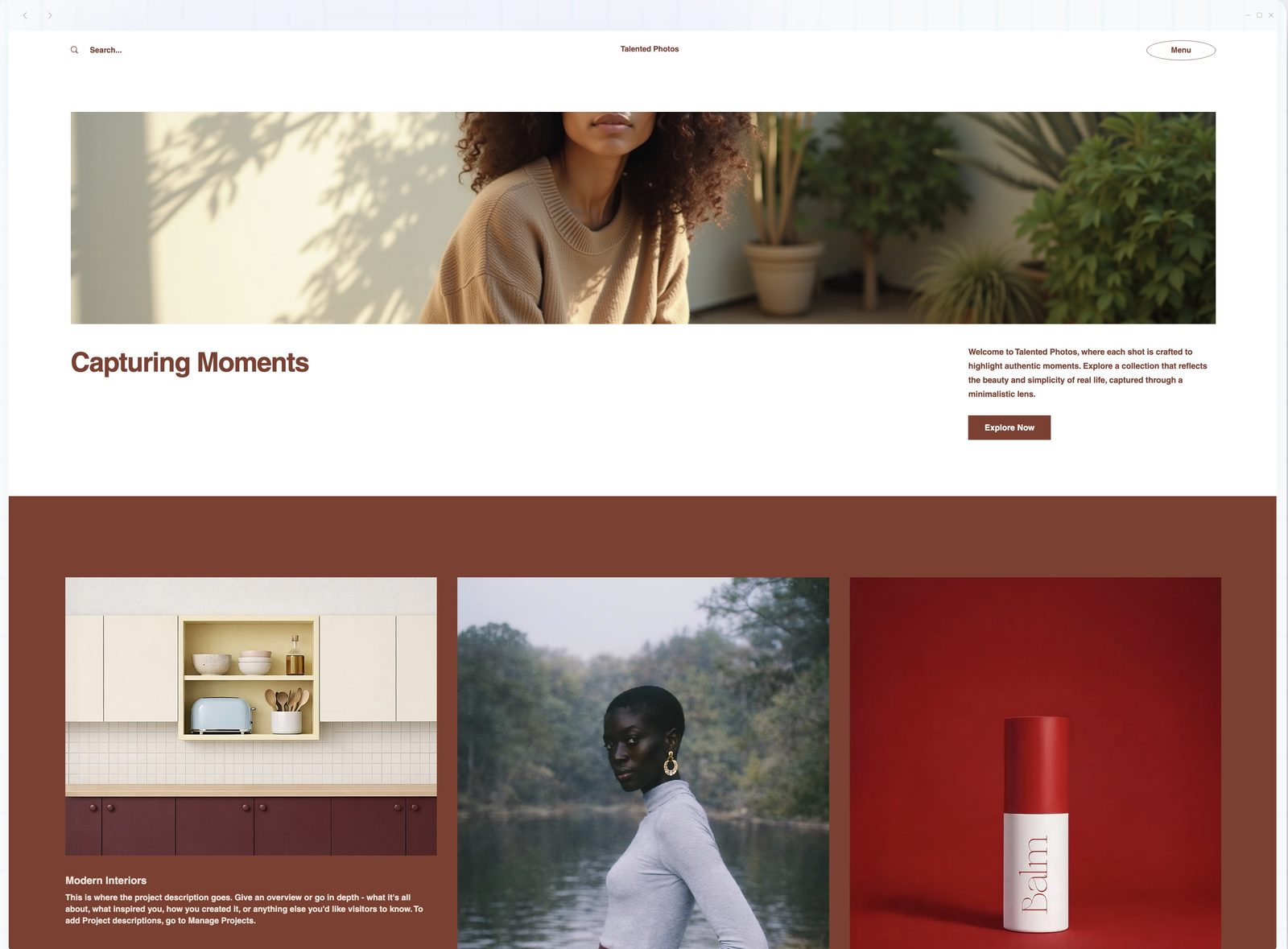
Time to first result: 3 minutes What happened: Wix ADI asked a handful of questions: site type, business name, and features needed. The brief didn't include a business name, so Wix prompted us to enter one during setup. We typed "Talented Photos." It then generated a complete three-page site. The homepage had a hero image, a headline, a short about section, and navigation to the other two pages. The gallery page used a standard grid. The contact page had a form.
At first glance, it delivered everything the brief asked for. The problem became apparent on closer inspection.
The AI chose a dark red and terracotta colour palette entirely on its own. Nowhere in our brief did we request those colours. More concerning: the stock images it populated the site with had nothing to do with photography. Kitchen interiors. Product shots. Generic corporate imagery. For a photographer's portfolio, the images are the content, and Wix filled the most important slots with completely wrong visuals. The layout was a full-width hero image, centred white text, a "View My Work" button, and a thin divider before the bio section. If you've browsed Wix's template gallery, you've seen this exact arrangement dozens of times.
Within seconds of generation, a prompt appeared to upgrade to a paid plan for a custom domain. The speed from brief to upsell was impressive, if nothing else.
What worked: Speed is Wix's one clear strength. From account creation to a publishable site, the entire process took under five minutes. The contact form worked immediately. The gallery had a lightbox built in. Mobile responsiveness was automatic. SEO basics (meta titles, descriptions, sitemap) were set up without asking. For someone who needs a functional website today and cares more about "it exists" than "it's distinctive," Wix ADI delivers.
What didn't: The design made no creative decisions that matched the brief. A photographer's portfolio should feel like it was curated by someone with a visual eye. The Wix output felt like it was assembled by software that knew what a photography website usually contains but had no opinion about how it should feel, and actively made wrong choices about colour and imagery. The terracotta palette, the kitchen stock photos, the corporate spacing: it looked "done" at first glance and fell apart the moment you looked closely. Typography was safe. Nothing was broken, and nothing was right.
Customisation was possible but slow. Wix's editor is powerful but complex. Moving a single element required understanding Wix's section-based layout system, which has its own logic that doesn't always match what you're trying to do. The AI got us to a finished-looking surface in three minutes; making it correct would have taken longer than building from scratch in a more flexible tool.
Squarespace AI: The Best-Dressed Template
Time to first result: 5 minutes What happened: Squarespace's AI assistant walks you through a guided setup: name, site type, visual preferences. It then generates a site using one of Squarespace's own templates, customised with your content and colour preferences.
The result was immediately more polished than Wix. Squarespace has always had stronger default typography and spacing, and the AI leveraged that well. The homepage felt more intentional, with better whitespace, more confident font choices, and a subtle scroll animation on the gallery preview section.
What worked: Visual quality out of the box was the highest of the four traditional builders. The dark theme looked good: deep charcoal rather than pure black, with warm cream text that felt deliberate rather than default. Image handling was strong; the gallery used a masonry layout that gave different-sized images room to breathe. The overall impression was "someone with design taste made this," which is exactly what a portfolio site needs.
What didn't: Flexibility. Squarespace's beauty comes at the cost of constraint. Moving elements around was limited to what the underlying template structure allows. We wanted to add a full-bleed image between the bio and the gallery preview on the homepage, a simple design request, and Squarespace simply wouldn't allow it within the template's layout rules. The AI generated a beautiful starting point, but the moment we wanted to deviate from its vision, we hit walls.
The other issue: cost. Squarespace has no free publishing tier. The cheapest plan that removes Squarespace branding and lets you use a custom domain is $16/month (billed annually). For a simple portfolio, that's a meaningful recurring expense, especially when competing tools offer free tiers.
Framer AI: The Surprise Winner
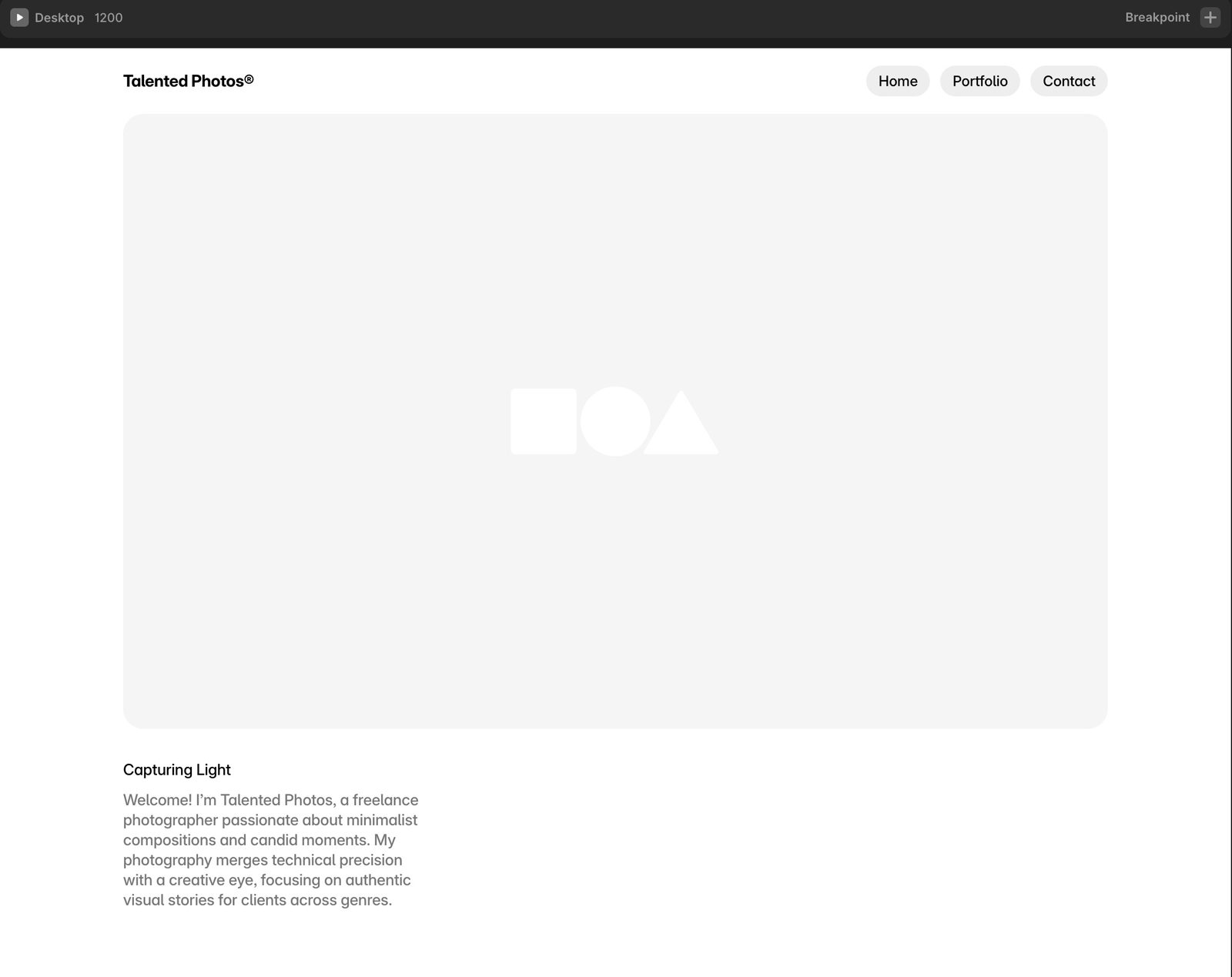
Time to first result: 90 seconds What happened: We pasted the brief into Framer's AI generator and pressed enter. Ninety seconds later, we had a three-page site with exactly the structure we asked for: Home, Portfolio, Contact, correctly labelled in the navigation. Of all four tools, Framer followed the brief most precisely.
Framer AI didn't just populate a template. It made genuine layout decisions: an asymmetric hero section with a headline in an oversized serif font on the left and a placeholder shape on the right where a hero image would go. The portfolio page used a staggered grid with hover effects that revealed image titles. The contact page was minimal in the right way, not empty, just focused.
The copy was notably better than Wix's generic filler. Framer's AI referenced "minimalist compositions and candid moments," language that felt like it had actually read the brief and understood the photographer persona, not just plugged a business name into a template sentence.
What worked: The structure and design decisions were the best of the four by a visible margin. Framer's AI appears to have absorbed good design principles. It understands visual hierarchy, negative space, and typographic contrast in a way the other tools don't. The dark theme was excellent: a near-black background with subtle warm accents that felt curated rather than generated.
Beyond the initial output, customisation was the strongest of the four. Framer's editor is closer to Figma than to a traditional website builder. Everything is a layer, everything can be moved, and the AI's output is fully editable with no template constraints. When we wanted to add a full-bleed image that Squarespace wouldn't allow, Framer let us drop it in and adjust the spacing in about thirty seconds.
The free tier is generous enough to publish a real site (with Framer branding). Custom domains start at $10/month.
What didn't: Here's the key tension with Framer: it produced the best skeleton of all four tools, but it looked unfinished. The hero image area was empty: just placeholder shapes, no stock photos at all. The portfolio grid had the right layout but no images in it. Unlike Wix, which filled slots with wrong images, Framer left them empty and waited for you to bring your own content.
This is actually the right behaviour for a portfolio site. A photographer's website should show their photos, not stock images of kitchen interiors. But it means the Framer output looks like a wireframe until you add your own work. Wix looks done but isn't yours. Framer is actually yours but looks empty. Which is worse depends on whether you value appearance or accuracy.
The editor is a designer's tool wearing a beginner's interface. Approachable on the surface, but the moment you need to do something specific (adjust a responsive breakpoint, add a conditional interaction, or set up form submissions) you're in territory that assumes some design vocabulary. It never became difficult, but there were moments where a complete beginner might need to search for a tutorial.
SEO setup was also thinner than Wix or Squarespace. Meta descriptions had to be added manually. The sitemap existed but wasn't as comprehensive. For someone publishing a simple portfolio these gaps are minor, but they're worth noting.
Bolt.new: The Wildcard That Wrote Real Code
Time to first result: Over 10 minutes (including one failed attempt) What happened: Bolt.new is not a traditional website builder. It's an AI-powered development environment. You describe what you want, and it writes actual code (React, by default), generates a live preview, and lets you deploy. We covered this tool and its peers in our guide to vibe coding tools, but this test specifically evaluated it as a website builder for someone who just wants a portfolio site.
We pasted the same brief. Bolt's first attempt got stuck. The generation stalled partway through, and we had to start a new session. Unlike the traditional builders, which always produce something, Bolt can simply fail. The second attempt, with the same brief, worked. The result was worth the retry.
Bolt generated a complete React application with three routes (home, portfolio, contact), a dark theme, smooth page transitions, an image grid with a lightbox component, and a contact form. The code was visible in a split pane alongside the live preview.
What worked: The result looked nothing like a template, because it wasn't one. Bolt wrote custom components from scratch, and the design choices showed real sensibility. The homepage had a full-bleed hero image, and unlike Wix's kitchen interiors, Bolt pulled a relevant stock photo: an actual photographer with a Canon camera in a sunflower field. The headline read "Capturing moments that matter" with "matter" set in serif italic, a typographic decision that showed more design awareness than anything the other three tools produced. It was the best AI-generated copy of the four and the most considered typography.
The page transitions were smooth. The hover effects on the portfolio grid were subtle and effective. It felt closer to a hand-built website than to anything the other three tools produced.
The output was also the most performant. Because it was static React with no builder overhead, the generated site loaded fast: no tracking scripts, no builder bloat, no unnecessary JavaScript libraries. For a portfolio where load speed directly affects whether a potential client sticks around, this matters.
What didn't: Reliability, first and foremost. The failed first attempt means you can't treat Bolt as a guaranteed one-shot tool. It took the longest of the four tools to produce a usable result, but when it worked, it produced the best result.
The obvious trade-off: you're looking at code. Even though Bolt's AI handles the writing, you're in a development environment. The preview is live, but adjustments require either re-prompting the AI or editing code directly. For someone comfortable with that, or willing to learn, it's the most flexible option. For someone who wants to drag and drop, it's the wrong tool entirely.
A "Made in Bolt" badge appeared on the free tier output, similar to the Framer and Wix branding but more prominent. The contact form didn't work out of the box. Bolt generated the front-end form component but didn't wire it to a back-end service. Getting it functional required either adding a form service (like Formspree) or writing a few lines of integration code. A traditional builder handles this automatically; Bolt assumes you'll solve it.
Deployment required a Netlify or Vercel account (both free), which adds a step that Wix and Squarespace don't have. It took about five minutes but it's not zero-friction.

Head to Head: The Comparison That Actually Matters
The features most comparison articles focus on (number of templates, drag-and-drop ease, plugin ecosystems) aren't what matters when the AI is doing the building. What matters is what comes out the other side.
Design quality: Framer > Bolt > Squarespace > Wix. Framer produced the most polished design. Bolt produced the most distinctive. Squarespace produced the most tasteful template. Wix produced the most generic result.
Speed to publish: Wix > Framer > Squarespace > Bolt. Wix is live in minutes with zero configuration. Framer is close behind. Squarespace's guided setup adds time. Bolt is the slowest and may require a retry if the first generation stalls, but it produces the most distinctive result when it works.
Customisability: Bolt > Framer > Wix > Squarespace. Bolt gives you the code, which means unlimited flexibility. Framer's layer-based editor is close behind. Wix's section editor is capable but complex. Squarespace is the most constrained.
SEO out of the box: Wix > Squarespace > Framer > Bolt. Wix auto-generates meta tags, sitemaps, and structured data without you touching a settings page. Squarespace does nearly as much. Framer requires manual SEO setup, and Bolt generates a React SPA that needs server-side rendering and sitemap configuration before Google can crawl it properly.
Cost to go live (custom domain): Bolt ($0 hosting + $10-15/year domain) > Framer ($10/month) > Wix ($17/month) > Squarespace ($16/month). Bolt deployed to Vercel's free tier is by far the cheapest long-term option, but it requires the most technical setup.
The Decision Framework
The right tool depends on one question: how much do you want to understand about what you're building?
"I just need a website that exists, today." → Wix ADI. It's the fastest path from nothing to a live site. The result will need image replacements and colour corrections (the AI's defaults are generic), but the structure will be functional, mobile-responsive, and findable by Google within a week. If your priority is existence over aesthetics and you're willing to spend an hour fixing the AI's guesses, Wix is the answer.
"I want something that looks good without learning web design." → Framer AI. It produces the best-looking results with minimal effort. The editor has a learning curve past the initial generation, but for a simple portfolio or marketing site, the AI's first output may be good enough with minor text changes. The free tier is generous enough to test without commitment.
"I want a polished, reliable site and I'm willing to pay." → Squarespace AI. If you value Squarespace's aesthetic and you're comfortable with its constraints, the AI-assisted setup saves time on a platform that's proven reliable for millions of sites. The cost is higher but the ecosystem (e-commerce, blogging, analytics) is more mature.
"I want to understand what I'm building and I'm willing to learn." → Bolt.new. The result is the most distinctive and the most flexible, but you're working in a code environment and it may take more than one attempt. If you're curious about web development, or if you're already comfortable with it, Bolt gives you something the template-based tools never will: complete ownership of every line of your site. Just budget for the possibility that the first generation stalls.
If you're completely new to AI tools and not sure where to start, our beginner's guide to getting started with AI covers the basics without assuming any technical background.
The Fifth Option: Building From Scratch With AI
There's a category of AI website building that none of the tools above represent — and it's how this site was made.
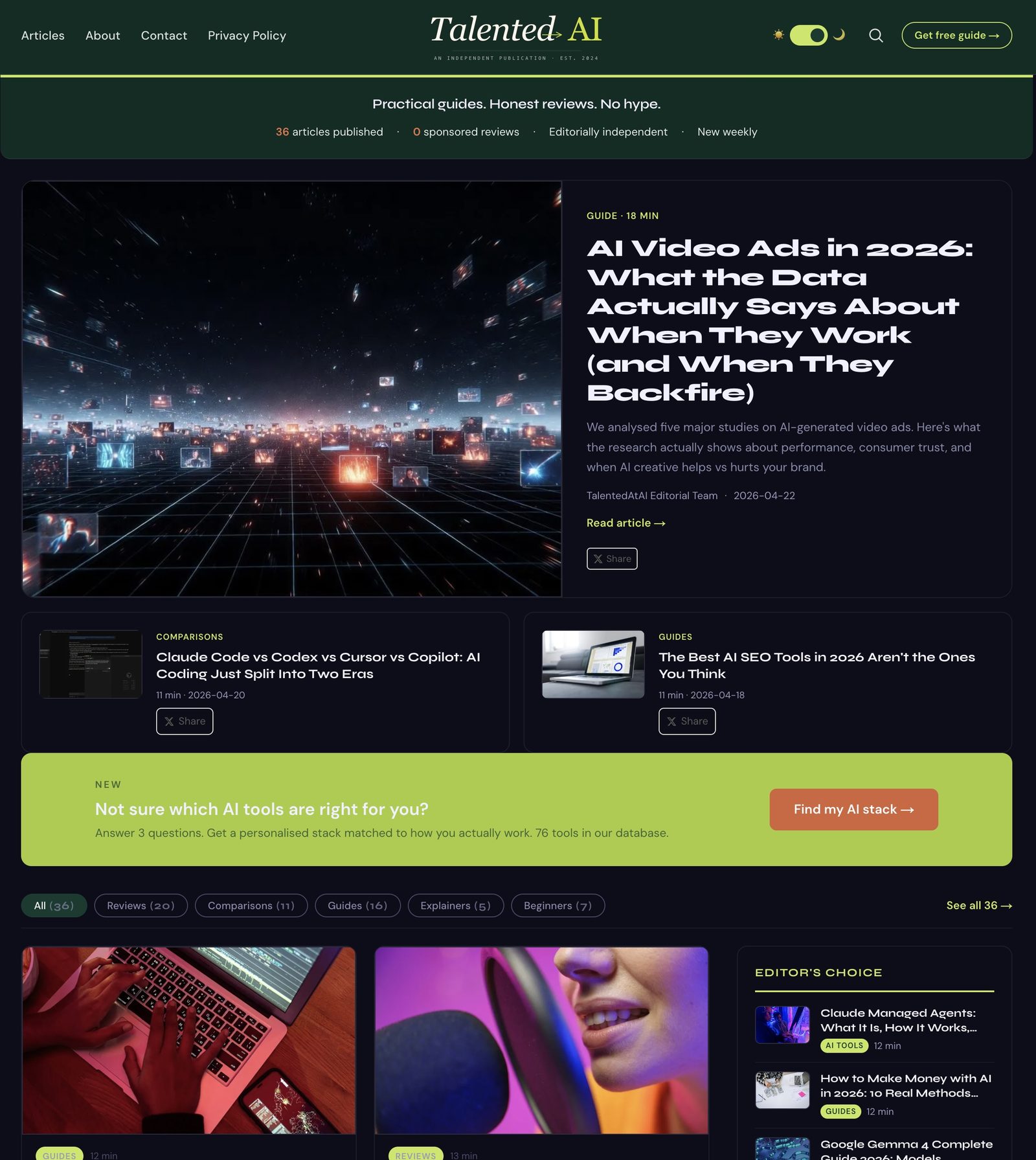
TalentedAtAI was not built with Wix, Squarespace, Framer, or any website builder. It was built entirely through conversation with Claude. Not Claude as a chatbot giving advice, but Claude Code as a development partner that wrote the actual code, built the infrastructure, and handled the technical decisions.
The site runs on a custom static site generator. Articles are written in Markdown, converted to HTML by a Node.js build script that Claude Code wrote and iterates on. The build pipeline handles responsive image generation, JSON-LD schema injection (Article, FAQ, BreadcrumbList), sitemap auto-generation, dark mode, an audio player for articles with audio summaries, and a reading progress bar. It's hosted on Cloudflare Pages (free tier, zero hosting cost) with GitHub for version control.
The performance results speak for themselves: 99 out of 100 on Lighthouse mobile, 2.0-second Largest Contentful Paint, 100 for SEO, 100 for Best Practices. No traditional website builder matches those numbers because every builder adds overhead (tracking scripts, unused CSS, framework bloat) that slows things down.
But let's be honest about the trade-offs. This approach took weeks, not minutes. It required patience, willingness to iterate through problems, and comfort with a workflow that looks nothing like dragging and dropping elements on a canvas. There were days when getting a single feature right (the responsive image pipeline, the FAQ schema, the dark mode toggle) took an entire session of back-and-forth with Claude.
The result is a site with complete control over every design decision, every performance optimisation, and every line of code. No platform lock-in. No monthly subscription for hosting. No templates. Every page looks exactly the way it was intended to look because every layout choice was a deliberate conversation, not a default.
This approach isn't for everyone. If you need a website this week, use one of the four tools above. But if you're willing to invest time in exchange for total control and zero ongoing cost, the combination of Claude Code and a free hosting platform like Cloudflare Pages gives you more control than any website builder on the market.
And it illustrates the distinction this entire article is making: there's a difference between an AI website builder — a tool that builds a website for you — and AI-assisted building — using AI as a collaborator while you make the decisions. Both are valid. The first is faster. The second is yours.
For a broader look at how AI content tools fit into a marketing workflow beyond just building the site, see our guide to AI for content marketing in 2026.
The Bigger Picture
Two years ago, building a website without coding meant choosing a template and changing the colours. The AI tools available today are genuinely better than that. They make real design decisions, generate custom layouts, and produce results that would have required a designer a few years ago.
But the gap between "AI-generated website" and "website that feels like yours" is still real. The template-based tools (Wix, Squarespace) have gotten better at disguising their templates, but a trained eye (or a potential client browsing photographer portfolios) can still spot the sameness. The AI-native tools (Framer, Bolt) are closing that gap faster because they're not constrained by template libraries.
The trajectory is clear: within a year or two, the distinction between "AI-built" and "human-built" websites will be meaningless for most use cases. We're not there yet. In April 2026, the tool you choose still determines whether your site feels like yours or feels like everyone else's.
Choose accordingly.