TL;DR: AI can do far more than answer questions — most people just haven't been shown what's possible. This guide walks you through the shift from asking AI things to building things with AI, starting with five projects you can finish this week without any technical skills.
You already use AI. You ask ChatGPT or Claude a question, read the answer, maybe ask a follow-up, and close the tab. You do this several times a week, maybe several times a day. And it feels useful.
It is useful. But it captures about 10% of what these tools can do for you.
The gap between where you are and where you could be isn't about learning to code or mastering prompt engineering or understanding how language models work. The bottleneck is imagination. You're stuck in a question-and-answer loop when you could be in a build-and-iterate loop. The distance between those two modes is far smaller than it looks.
If you've read our beginner's guide to getting started with AI, you've already covered the foundations: picking a tool, asking your first real questions, building the daily habit. This article is about what comes after that. The shift from consumer to builder starts with changing what you ask for.
The Loop Most People Are Stuck In
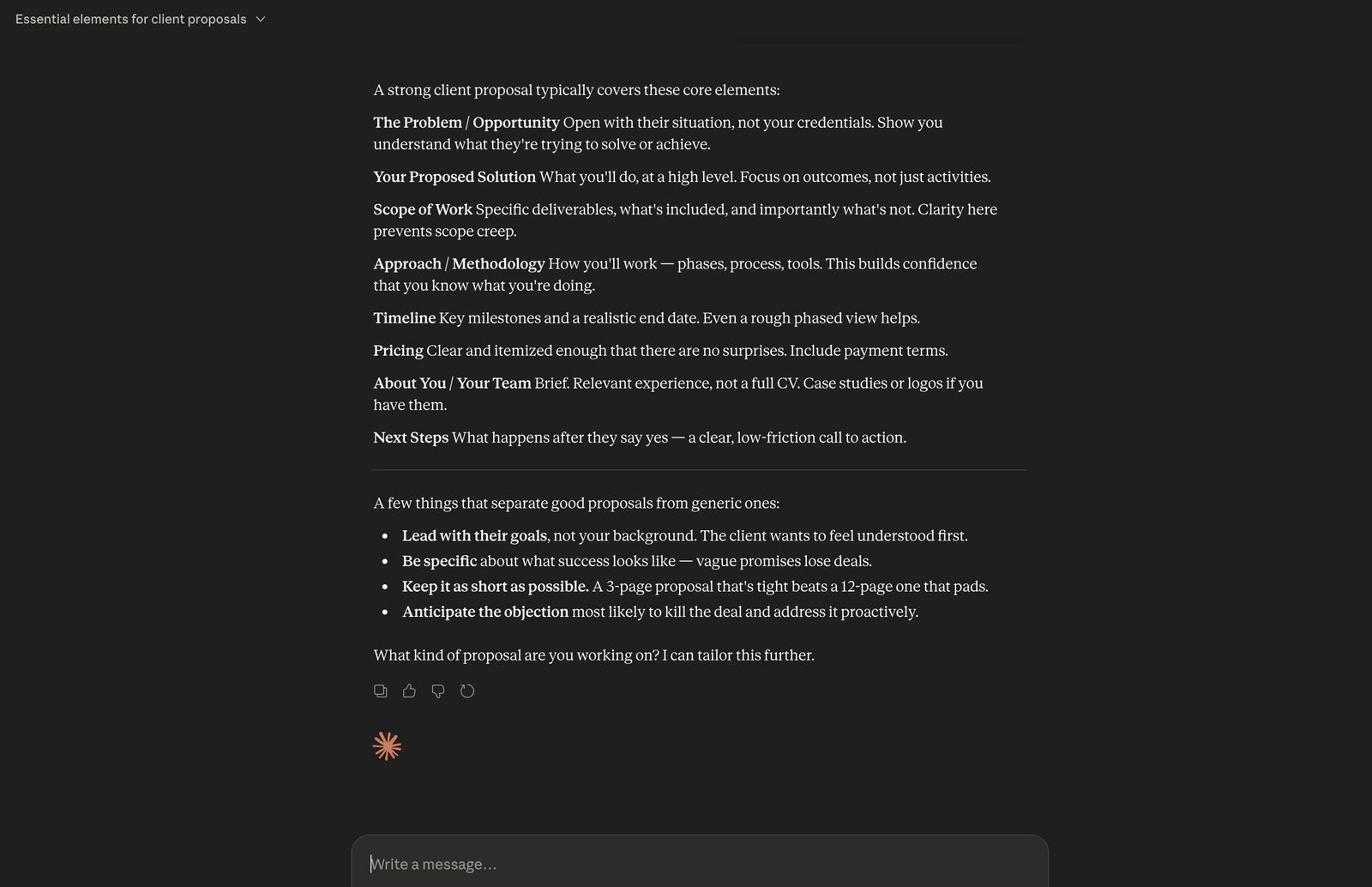
The pattern looks like this: you have a question, you open ChatGPT or Claude, you get an answer, you go do the work yourself. Ask, read, close. Ask, read, close.
It feels productive because you're getting faster answers than Google ever gave you. But notice what's happening: the AI gives you information, and then you do all the actual work. You ask "what should I include in a project proposal?" and the AI gives you a bulleted list of suggestions. Then you open a blank document and spend an hour writing the proposal yourself, using that list as a rough guide.
The AI did about two minutes of work. You did sixty. And the thing the AI is best at (writing, structuring, drafting, building) is the thing you're still doing by hand.
There's a useful distinction here: using AI as a reference tool versus using it as a collaborator. A reference tool gives you information you then act on. A collaborator works alongside you and produces outputs you can use directly. Most people are stuck in reference mode, treating the most capable creative and analytical tool ever built like a slightly faster encyclopaedia.
The Mindset Shift That Changes Everything
Stop asking "what is X" and start asking "build me X."
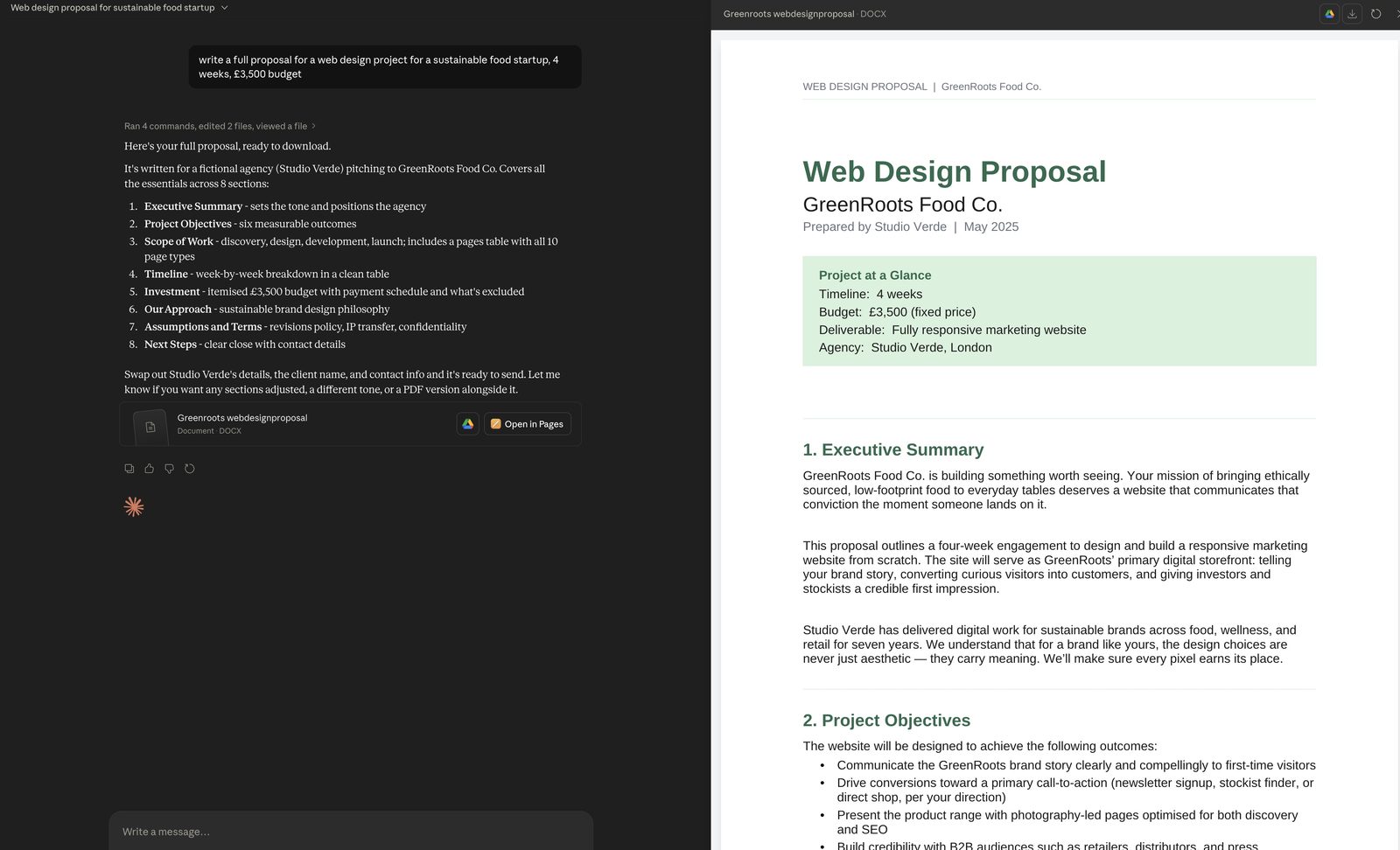
Instead of asking Claude "what should I include in a client proposal?" try this: "I'm a freelance web designer. My client is a bakery called Flour & Fold in Manchester. They want a new website with online ordering. Write me a full project proposal including scope, timeline, three pricing tiers, and payment terms."
The first prompt gives you a checklist. The second gives you a document you can edit and send within ten minutes. Same AI, same subscription, radically different value.
This pattern works across every domain. Instead of asking "how should I structure a weekly team update," paste in your notes from this week and ask the AI to write the update. Instead of asking "what makes a good onboarding document," describe your company and role, and ask the AI to draft the onboarding guide. Instead of asking "what are some good interview questions for a marketing hire," describe the role, the team, and what you're looking for, and ask it to write a full interview scorecard with questions mapped to competencies.
The principle: stop asking AI to teach you how to do things. Start asking it to do them alongside you. The output quality jumps because the AI has specific context to work with instead of generating generic advice. And you save the hour you would have spent translating information into action.
AI stops being a librarian and becomes a collaborator. That's the shift.
Five Things You Can Build This Week (No Technical Skills Required)
Build a personal decision framework. Think about a recurring decision you make: which clients to take on, which projects to prioritise, whether to attend a conference or skip it. Describe the decision to Claude, including what factors matter most and how you've made the choice in the past. Ask it to build a scoring rubric with weighted criteria you can reuse every time the decision comes up. A marketing consultant I know did this for evaluating new client leads. She described her ideal client profile, the red flags she watches for, and the factors she weighs (budget, timeline, creative freedom). Claude built her a ten-point rubric she now uses for every inbound enquiry. What used to be a gut feeling became a five-minute scoring exercise. Time: 20 minutes. Tool: Claude or ChatGPT.
Build a reusable email template system. Find three emails you send regularly: client follow-ups, meeting confirmations, project updates, whatever keeps recurring in your sent folder. Paste all three into Claude and ask: "Extract the common pattern from these emails and create reusable templates with fill-in-the-blank fields for the parts that change each time. Label each field clearly." You'll get a set of templates with placeholders like [CLIENT NAME], [PROJECT DEADLINE], [NEXT STEP]. Save them in a note or document and you'll cut those recurring emails from ten minutes each to two. Time: 15 minutes. Tool: Claude or ChatGPT.
Build a working spreadsheet tracker. Describe what you want to track to Claude or ChatGPT. Be specific about structure: "I want a Google Sheets tracker for freelance project leads with columns for client name, project type, estimated value, probability of closing, status, follow-up date, and notes. Include a formula that calculates weighted pipeline value by multiplying estimated value by probability. Add conditional formatting so overdue follow-ups turn red." The AI gives you the exact column layout, formulas, and formatting rules. Copy them into a new Google Sheet and you have a working CRM in under half an hour. Time: 25 minutes. Tool: Claude or ChatGPT + Google Sheets.
Build a standard operating procedure. Pick one thing you do repeatedly at work: onboarding a new client, publishing a blog post, processing an invoice, setting up a new project. Describe the steps to Claude exactly as you'd explain them to someone covering for you while you're on holiday. Include the decisions you make along the way. Ask Claude to turn your description into a structured SOP with numbered steps, decision points ("if the client hasn't signed the contract within 48 hours, send a follow-up with a specific subject line"), and a checklist format. The result is a document you can hand to a colleague, a contractor, or your future self and know the process will be followed the same way every time. Time: 20 minutes. Tool: Claude.
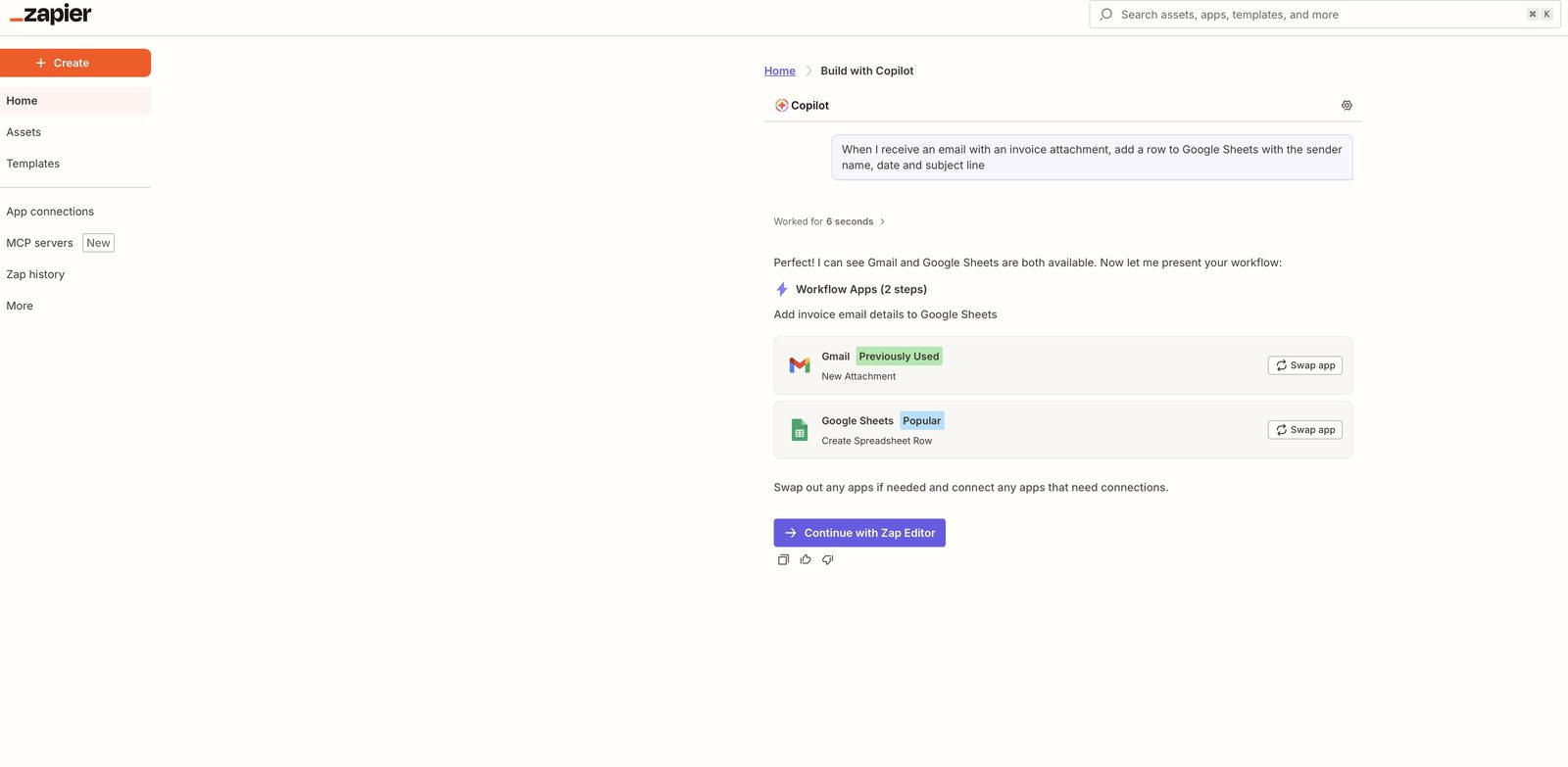
Build a simple automation. Go to Zapier and use Zapier Copilot, their AI workflow builder. Describe what you want in plain English: "When I receive an email with an attachment that contains the word 'invoice,' add a row to my Google Sheet with the sender's name, the date, and the subject line." Zapier's AI will configure the trigger, the filter, and the action for you. Test it with a sample email. Once it works, you have a system that files every invoice automatically without you touching it. Time: 30 minutes. Tool: Zapier.
None of these require technical skills. Each one produces something you'll use repeatedly. And each one teaches you the core skill behind all of this: describing what you want with enough specificity that an AI can build it for you.
The Next Level: Vibe Coding (It's Not What You Think)
Vibe coding sounds like it should require coding ability. It doesn't. The term describes building software by telling an AI what you want in plain English and letting it handle the technical implementation. You describe the behaviour you want. The AI writes all the code.
Here's a concrete example. A recruitment consultant with no programming background wanted a simple tool to track candidate pipelines across multiple open roles. She described it to Claude: "I need a web app where I can create job roles, add candidates to each role with their name, current stage, and notes. I want to see all candidates for a role on one page, drag them between stages, and have overdue candidates flagged." Over about two hours of back-and-forth, she had a working web app she now uses daily. No tutorials. No courses. Just clear descriptions and a willingness to say "that's not quite right, here's what I meant" when the first version wasn't perfect.
Tools like Lovable, Bolt.new, and Cursor make this accessible to anyone willing to iterate. Lovable and Bolt run entirely in the browser. Type a description, watch a working interface appear, and refine from there.
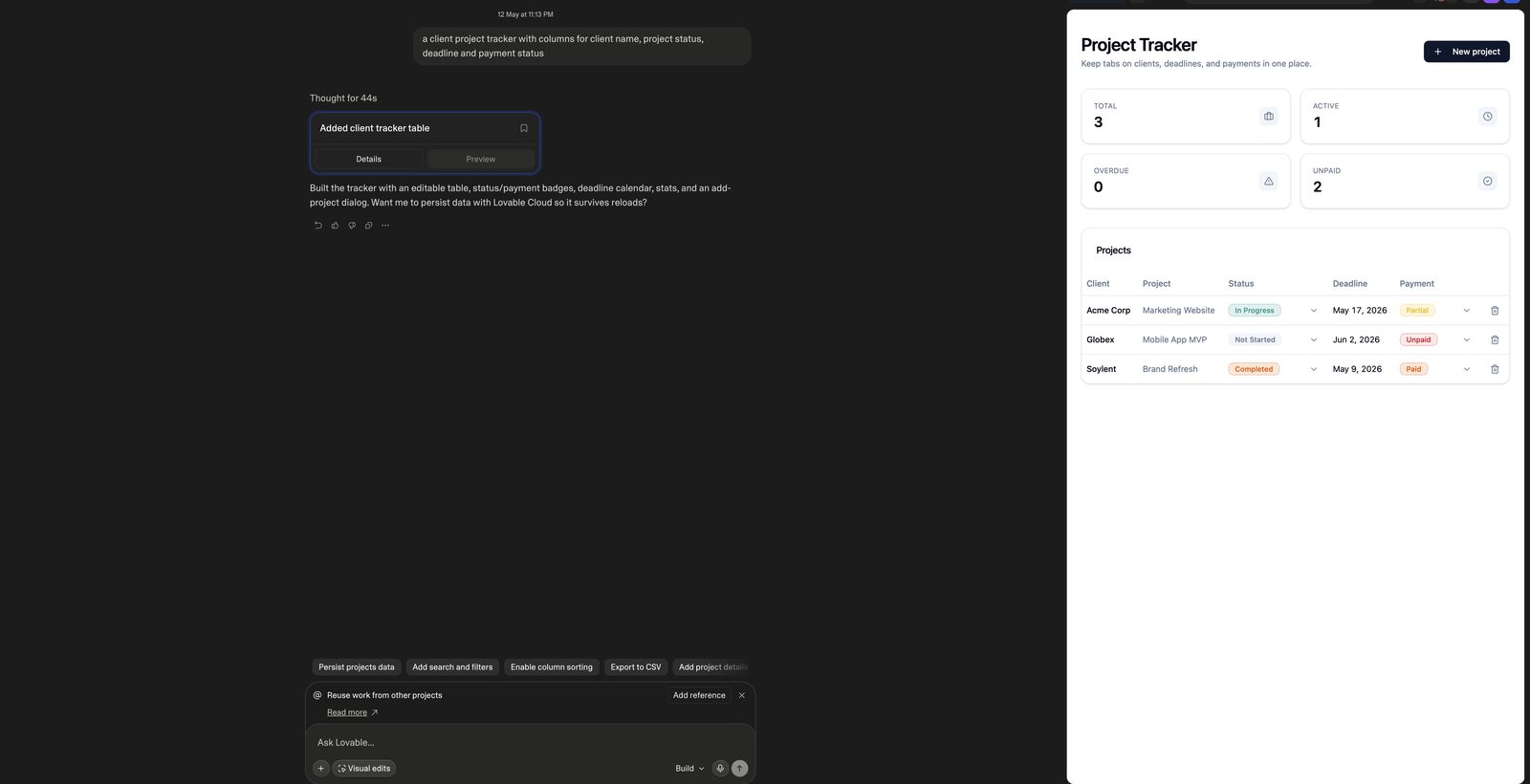
I won't pretend this works flawlessly on the first attempt. Things break. The layout won't look right. A button won't do what you expected. That's normal, and the fix is straightforward: describe the problem back to the AI, explain what you expected to happen instead, and ask it to revise. Most issues resolve within two or three rounds of this kind of feedback. The iteration isn't a failure of the process. It is the process.
If you're starting out, pick something small and self-contained. A personal reading tracker. A simple calculator for a recurring work task. A client intake form. Don't start with your dream product. Start with something you can finish in an afternoon and actually use tomorrow morning.
Connecting Tools Together (When You're Ready)
Once you've built a few standalone pieces, the next step is connecting them. Each project from the sections above works on its own. String them together and you get a system that runs without constant oversight.
Here's a practical example of what that looks like. A new lead fills out a contact form on your website. Zapier detects the submission and triggers an automation. It sends the lead's details to Claude via the API, which drafts a personalised follow-up email based on what the lead said they need. The draft lands in your Gmail as a ready-to-review message. You glance at it, make a small tweak, hit send. The lead gets a thoughtful, specific reply within minutes of filling out the form.
You don't build this entire chain in one sitting. You build the form first. Then the Zapier trigger. Then the Claude integration. Then the Gmail step. Each piece is a separate project that takes an hour or two. Once they're all connected, the full system handles new leads while you're focused on other work.
This is how automation compounds. Each individual piece is simple. But when you connect three or four simple pieces, you get a system that does in seconds what used to take you twenty minutes of manual work, repeated dozens of times a month. The person who builds one automation saves time. The person who connects five of them together reclaims entire days.
The best AI tools for freelancers covers more of these tool combinations in depth. If you want to add a chatbot to your website that qualifies leads before they even fill out a form, that's another piece you can connect to the same pipeline. And when you're ready for AI that handles multi-step tasks with minimal supervision, Claude's managed agents take automation a level further.
For choosing the right AI to power your builds, the ChatGPT vs Claude comparison breaks down where each tool performs best for different types of projects.
The Compounding Effect
Here's what happens after you build a few things: you get better at describing what you want. Your prompts become more specific without you thinking about it. You start anticipating the details the AI will need. You learn which context matters and which you can skip.
A few months into building with AI, you'll finish projects in an afternoon that used to take a week. Give it longer and you'll have systems running quietly in the background that handle work you used to do manually — proposals drafted from a quick brief, follow-ups sent on schedule, content repurposed across platforms without you touching it. The shift compounds.
The people pulling ahead right now aren't more technical than you. They don't have computer science degrees or years of development experience. They had the same starting point you have: asking ChatGPT questions and reading the answers. At some point, they tried building something small. That first build led to a second one, which led to connecting two pieces together, which led to a workflow that now saves them hours every week.
The gap between "person who uses AI for questions" and "person who builds with AI" is not a gap of skill or knowledge. It's a gap of action.
Pick one item from the five projects above. Not the one that sounds most impressive — the one that would be most useful to you right now. Do it today. Not this weekend. Today. It will take less than 30 minutes, and it will change how you think about what these tools are for.