TL;DR: AI coding tools have split into two eras — autocomplete tools (Copilot, Cursor) that make you faster, and agentic tools (Claude Code, Codex) that do the work while you supervise. The right choice depends on where you are as a developer right now. Claude Code is the most capable agentic tool but demands terminal fluency. Codex is best for async delegation. Cursor bridges both eras in a familiar IDE. Copilot is table stakes. This isn't a ranking — it's a framework for choosing.
How we tested this: Every tool covered in this article was evaluated hands-on by the TalentedAtAI team. We used each tool on real projects — refactoring a production codebase, building features from scratch, debugging across multiple files, and generating boilerplate. Our verdicts are independent and based on what we actually experienced, not marketing claims.
Two months ago, we rebuilt the entire front-end of this site using Claude Code. Not piece by piece in an editor. We described what we wanted in a terminal, and an AI agent rewrote CSS across seven files, restructured navigation components, and updated a build script — all in a single session. We reviewed the output, caught two issues, and deployed.
A year ago, that workflow didn't exist. The best AI coding tool available was GitHub Copilot, and what it did was autocomplete — you typed a function name, and it guessed the next few lines. Useful. Genuinely productivity-enhancing. But fundamentally, you were still writing the code. The AI was a faster keyboard.
Something shifted in late 2025 and early 2026. A new category of tool appeared — one that doesn't autocomplete your code but writes it from scratch, runs it, tests it, hits an error, reasons about the error, fixes it, and hands you a working result. The human role changed from writing code to reviewing code. From typing to supervising.
Most comparisons of AI coding tools still treat them as a spectrum of the same thing. They're not. They're two fundamentally different relationships between a developer and a machine. And choosing the wrong one for your skill level and workflow creates frustration, not speed.

The Two Eras of AI Coding
The cleanest way to understand the current landscape is to stop thinking about individual tools and start thinking about eras.
Era 1: Autocomplete and acceleration. The AI suggests, completes, and explains. You write the code. It makes you faster. GitHub Copilot defined this era. Early Cursor lived here too. The mental model is pair programming — you're still the driver, the AI is a very fast passenger offering directions.
Era 2: Agentic coding. You describe the goal in natural language. The AI writes the code, runs it, encounters errors, reasons about them, fixes them, and iterates until the task is done. You review the output. Claude Code, OpenAI Codex, and Cursor's Agent mode operate here. The mental model is delegation — you're the tech lead, the AI is a junior developer who works at inhuman speed.
The distinction matters because the skills required are different. Era 1 rewards fast typing, knowing your language well, and being good at prompting inline suggestions. Era 2 rewards clear specification, code review ability, and architectural thinking. If you've been writing code for a decade and your value is in the typing, Era 2 will feel threatening. If your value is in knowing what to build and why, Era 2 will feel like a superpower.
We covered the broader vibe coding movement — including tools for non-developers — in our vibe coding tools guide. This article focuses specifically on professional developer tools and the question of which one fits your actual workflow.
| Tool | Era | Best For | Skill Floor |
|---|---|---|---|
| GitHub Copilot | Era 1 | Inline suggestions, code chat | Low — works in any IDE |
| Cursor | Era 1 + 2 | IDE-native AI with Agent mode | Medium — VS Code familiarity |
| Claude Code | Era 2 | Complex multi-file agentic work | High — terminal + codebase knowledge |
| OpenAI Codex | Era 2 | Async task delegation at scale | High — needs clear specifications |
Claude Code — The Most Capable, Least Forgiving
Claude Code is not an IDE plugin. It's not a sidebar. It's a command-line tool that operates directly on your codebase from the terminal. You type what you want in natural language, and it reads your files, reasons about the project structure, writes code across multiple files simultaneously, runs tests, interprets errors, and iterates until the task is complete.
What it does well. Claude Code's context window is its defining advantage. It can hold an entire mid-sized codebase in working memory and reason across files in a way that no IDE plugin matches. When we asked it to refactor a navigation component that touched seven HTML files and a build script, it understood the relationships between files, maintained consistency across all of them, and caught a CSS specificity issue that a file-by-file approach would have missed. The reasoning is genuinely sophisticated — it doesn't just pattern-match, it understands what it's doing and explains why.
Multi-file edits are where Claude Code separates from everything else. Cursor Agent can edit across files, but Claude Code does it with deeper contextual awareness. It reads your project conventions, follows your naming patterns, and writes code that looks like it belongs in your codebase rather than code that was generated by a different mind.
What it doesn't do. Hand-holding. There is no GUI. There is no file tree with green and red highlights showing what changed. There is no "Accept" or "Reject" button for individual lines. You get a terminal, a prompt, and the output. If you're not comfortable reading diffs and navigating a codebase from the command line, Claude Code will feel like being dropped into the deep end of a pool.
Onboarding is non-trivial. You need to install it, configure API access, and understand how to structure your prompts for agentic work — which is different from prompting a chatbot. The documentation is good, but there's no gentle ramp.
Who it's for. Developers who are already comfortable in the terminal, working on real projects with real complexity. If you spend your day in VS Code, Claude Code will feel austere. If you spend your day in a terminal, it will feel like the most powerful tool you've ever used.
Pricing. Usage-based through the Anthropic API. There's no flat monthly fee — you pay per token, which means costs scale with usage. A light session might cost a few dollars; a heavy refactoring session across a large codebase could cost significantly more. The unpredictability is the tradeoff for the power. There's also a Max plan subscription option which bundles usage into a monthly fee.
Verdict: The most powerful AI coding tool available in April 2026 — and the one with the highest floor. If you're already a developer who works in the terminal, start here. If you're not, don't — you'll spend more time fighting the interface than benefiting from the intelligence. For a broader look at how Claude compares to ChatGPT across non-coding tasks, our ChatGPT vs Claude comparison covers writing, reasoning, and document analysis.
OpenAI Codex — The Cloud Agent
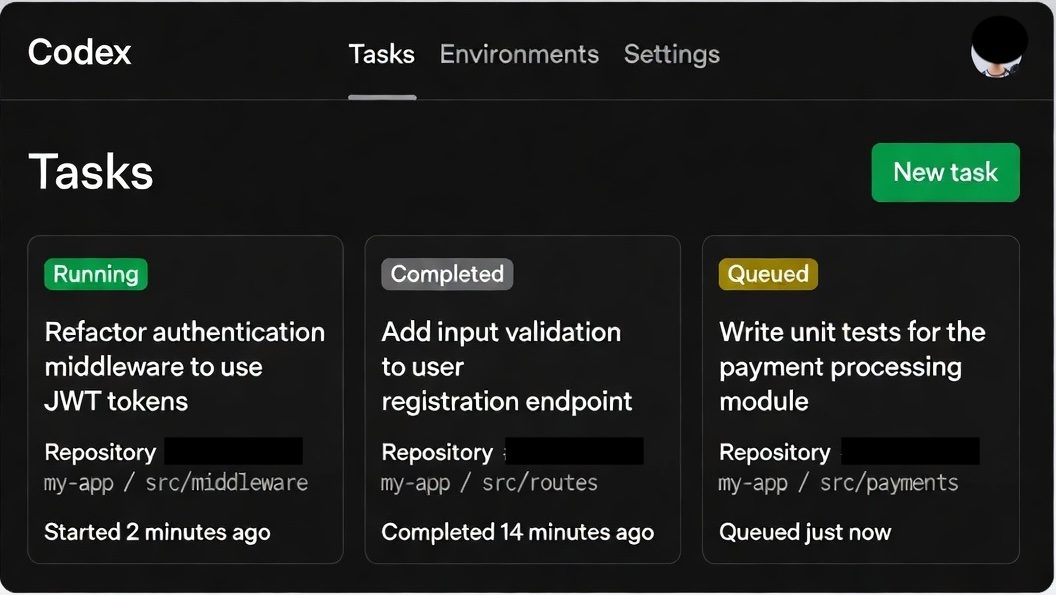
OpenAI Codex relaunched in 2026 as something entirely different from its original code-completion API. The new Codex is a cloud-based coding agent — you describe a task, and Codex spins up a sandboxed environment, clones your repository, writes the code, runs the tests, and delivers a pull request. All of this happens asynchronously, in the cloud, while you do something else.
What it does well. The async model is Codex's most distinctive feature. With Claude Code, you're watching the agent work in your terminal — it's impressive but it occupies your attention. Codex runs in the background. You can queue up multiple tasks and come back to finished pull requests. For teams managing a backlog of small-to-medium features and bug fixes, this changes the economics of development time.
The sandboxed execution environment is another genuine advantage. Codex doesn't run code on your machine. It spins up a clean container, installs dependencies, and executes in isolation. This means it can test aggressively — running your full test suite, catching regressions, iterating on failures — without risk to your local environment.
Key differentiator. Parallelism. Claude Code operates in a single terminal session — you're watching one agent do one thing. Codex can run multiple tasks simultaneously. You can ask it to fix a bug in one module, add a feature in another, and write tests for a third, all at the same time. Each task gets its own sandboxed environment and delivers its own pull request.
What it doesn't do. Real-time pair programming. Codex is not sitting in your editor offering suggestions as you type. It's not a conversational partner you iterate with line by line. You write a specification, submit it, and wait. If the specification was unclear, you get back a result that doesn't match what you wanted — and the feedback loop is slower than with Claude Code, where you can course-correct in real time.
Who it's for. Development teams and individual developers who want to delegate defined tasks — bug fixes, feature implementations, test coverage expansion — rather than pair-program with an AI. If you think in tickets and pull requests, Codex fits your mental model. If you think in real-time conversation, it won't.
Pricing. Available through ChatGPT Pro ($200/month) which includes Codex access alongside ChatGPT's other capabilities. Also available through the API with usage-based pricing. The Pro plan is expensive for individual developers but reasonable for teams where the async delegation model genuinely saves developer hours.
Verdict: Best tool for async delegation at scale. If you have a clear backlog of well-defined tasks and want an AI that works through them while you focus on architecture and review, Codex is the strongest option. Less suited for exploratory work where you're figuring out the approach as you go — that's where Claude Code's interactive model wins.
Cursor — The Bridge Tool
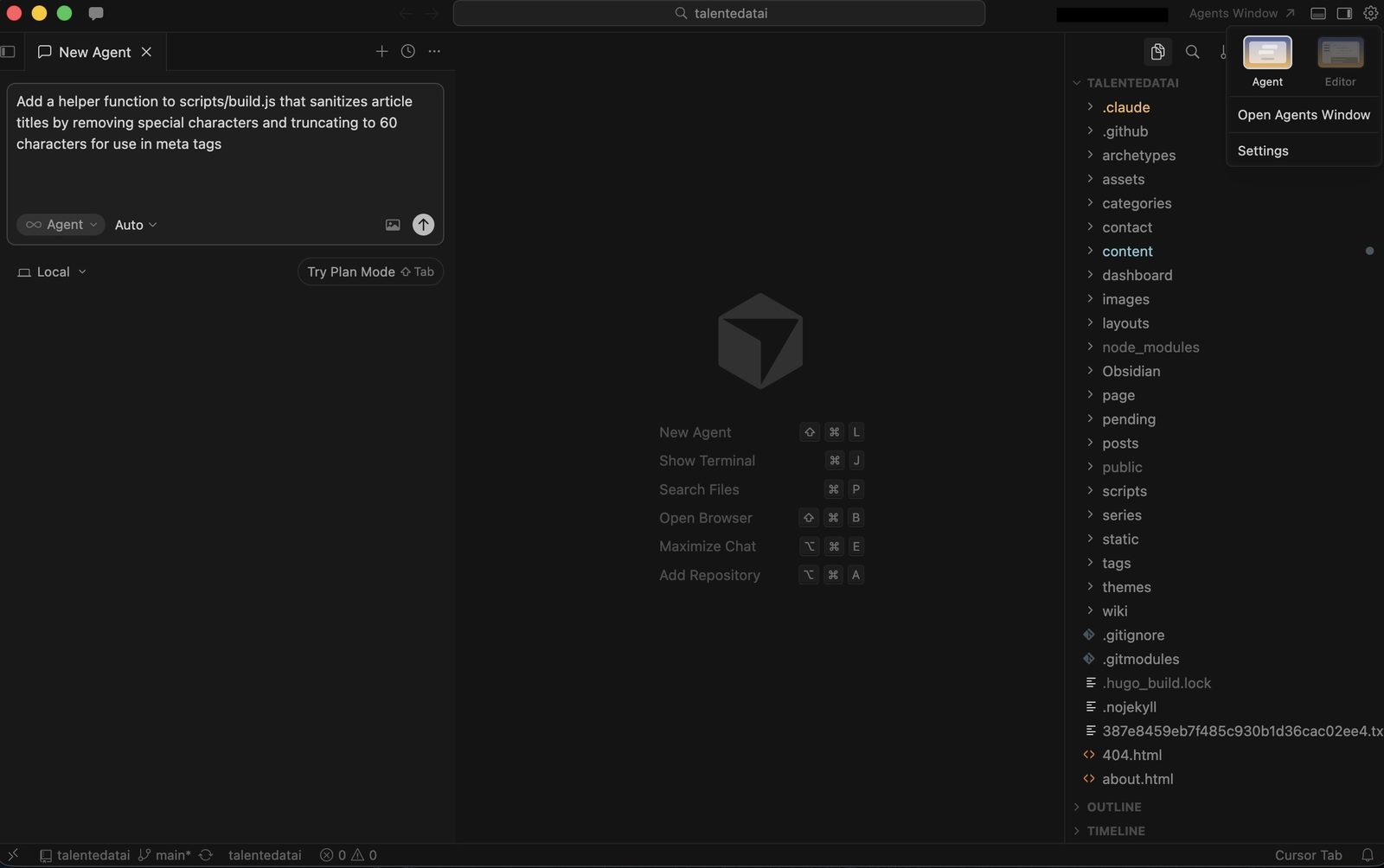
Cursor occupies a unique position: it's the only tool on this list that credibly spans both eras. At its foundation, it's a VS Code fork with deeply integrated AI autocomplete and chat — solidly Era 1. But its Agent mode pushes into Era 2 territory, letting you describe a task in natural language and have Cursor write, edit, and iterate across multiple files within the familiar IDE environment.
What it does well. The IDE wrapper is Cursor's superpower. Everything happens inside a visual code editor that millions of developers already know. You can see your file tree. You can see diffs highlighted inline. You can accept or reject individual changes. You can run the app with one click and see the result. For developers whose muscle memory lives in VS Code, Cursor eliminates the cognitive overhead of switching to a terminal-based workflow.
The tab autocomplete is the best in the market — better than Copilot's in our testing. It predicts not just the next line but multi-line completions that account for the surrounding code context. For pure coding speed, Cursor's autocomplete alone justifies the subscription.
Agent mode is where things get interesting. You can type a natural language instruction — "add dark mode support to this component and update the CSS" — and Agent will make coordinated edits across files. It's less capable than Claude Code for complex, multi-step tasks. It doesn't reason as deeply across large codebases. But for simple-to-moderate agentic tasks, it works well enough — and it does it inside an environment where you can visually verify every change before it lands.
The honest assessment. Cursor's Agent mode is a bridge, not a destination. For straightforward agentic tasks — "refactor this function," "add error handling to these API calls," "write tests for this module" — it's excellent. For the kind of deep, multi-file reasoning that Claude Code handles — restructuring a build pipeline, redesigning a component architecture across a project, debugging a subtle interaction between systems — Cursor Agent falls short. It tends to make changes file by file rather than reasoning holistically about the codebase.
Who it's for. Developers who want agentic capabilities without leaving their IDE. If the terminal feels like a step backward from your current workflow, Cursor gives you 70% of the agentic capability in a familiar package. It's also the best entry point for developers who want to experiment with agentic coding before committing to a terminal-native tool.
Pricing. Free Hobby tier with limited requests. Pro at $20/month with credit-based billing — Auto mode is unlimited, and premium model selections draw from your credit pool. Business at $40/user/month. The Pro tier is sufficient for most individual developers.
Verdict: The best entry point into agentic coding and the best tool for developers who split their time between autocomplete work and agentic tasks. If you live in VS Code and aren't ready to move to the terminal, Cursor is the right choice. Just know that for complex agentic work, you'll eventually hit its ceiling — and Claude Code will be waiting on the other side.
GitHub Copilot — The Safe Default
GitHub Copilot doesn't try to be an agentic tool. It's an autocomplete engine and code chat assistant, deeply integrated into VS Code, JetBrains, Neovim, and virtually every editor that matters. It's Era 1 — and it does Era 1 well.
What it does well. Inline suggestions. You start typing a function, and Copilot completes it. You write a comment describing what you want, and Copilot generates the implementation. The suggestions are fast, contextually aware, and right often enough that accepting them becomes muscle memory. For boilerplate code, repetitive patterns, and standard implementations, Copilot saves meaningful time every day.
The chat feature lets you ask questions about your code, request explanations, and generate simple edits. It's less capable than Cursor's chat and significantly less capable than Claude Code's reasoning, but it's embedded in your workflow with zero friction.
What it doesn't do. Anything truly agentic. Copilot doesn't read your entire codebase, doesn't reason about multi-file relationships, doesn't run your tests, and doesn't iterate on errors. It sees the file you're editing and a limited surrounding context. For single-file work, that's sufficient. For cross-cutting changes, it's not.
GitHub has been adding agent-like features, and Copilot is evolving rapidly. But as of April 2026, it's fundamentally a suggestion tool — not a delegation tool.
Who it's for. Every developer. That's not hyperbole — Copilot's autocomplete is useful enough and low-friction enough that there's almost no reason not to have it active. It doesn't replace any of the other tools on this list. It supplements them. You can use Copilot for inline suggestions while using Claude Code for heavy agentic work. Most serious developers we know do exactly that.
Pricing. $10/month individual, $19/user/month for Business, $39/user/month for Enterprise. Free for verified students, teachers, and open-source maintainers. The individual tier is the most accessible entry point in AI coding.
Verdict: Table stakes in 2026. Not exciting. Not cutting-edge. But reliable, friction-free, and worth the $10/month for virtually any developer. Think of it as spell-check for code — you'd notice if it disappeared, even if you don't think about it while it's running.
Which Era Are You In?
This isn't a ranking because these tools aren't competing for the same job. The right choice depends on a question most comparisons skip: how do you actually want to work with AI?
"I want suggestions while I code." You're in Era 1, and that's fine. GitHub Copilot is the right tool. It's cheap, it's everywhere, and it makes you measurably faster without changing how you work. If you're happy with your current workflow and just want it accelerated, stop here.
"I want AI in my IDE with some agentic capability." Cursor. You get the best autocomplete on the market plus Agent mode for tasks that benefit from natural-language delegation. You stay in a visual editor, you see every change, and you can scale up your agentic usage at your own pace.
"I want to describe a task and review the output." You're in Era 2. The choice is between Claude Code and Codex, and it depends on your interaction preference. Claude Code is interactive — you watch it work, you course-correct in real time, and the feedback loop is tight. Codex is async — you submit a task, it works in the background, and you review a pull request when it's done.
"I'm not a developer but want to build things." None of these four tools are for you. Cursor with Agent mode is the closest, but the honest answer is that vibe coding tools like Replit Agent and Bolt are better starting points for non-developers. They handle the environment, the deployment, and the complexity that these professional tools assume you can manage yourself.
The Honest Bottom Line
We use Claude Code for complex, multi-file work — restructuring components, refactoring across a codebase, building features that touch multiple systems. It's the most capable tool available and the one that saves us the most time on the hardest tasks.
We use Cursor for quick edits in a familiar codebase — fixing a CSS rule, tweaking a function, adding a small feature where the context is obvious and a visual diff is more useful than a terminal session.
We keep Copilot running in the background for everything else.
That's not a universal recommendation — it's our workflow, and it works because we're comfortable in both the terminal and the IDE. If you're choosing one tool to start with, start with Cursor. It spans both eras, the learning curve is gentle, and if you outgrow its agentic capabilities, you'll know — because you'll find yourself wishing it could reason more deeply across your codebase. That's when Claude Code is worth the transition.
The era of AI as a typing assistant is ending. The era of AI as a coding partner — one you supervise rather than direct — has started. The only question is whether you're ready to stop writing code and start reviewing it. Most developers aren't, yet. But the tools are ready whenever you are.
Using an AI coding tool on a project you'd like us to cover? Get in touch — we feature real reader workflows and results.