TL;DR: Cloning your own voice with AI takes about ten minutes of hands-on work, but it isn't free — Instant Voice Cloning requires at minimum ElevenLabs' Starter plan at $5 per month. The free tier lets you test the platform's text-to-speech quality before committing, which is worth doing. This guide walks you through the whole process — sample recording, upload, the cloning workflow itself, and the legal and ethical lines — and is honest about exactly where you'll need to pay.
This article contains affiliate links. We may earn a small commission at no extra cost to you.
The first time you hear your own voice reading words you never actually said, something strange happens. It's not quite unsettling — you know you pressed the button, you know what the technology is — but the effect lands somewhere deeper than you expect. That is definitely your voice. Those are definitely not words you spoke. Both of those things are true at once, and your brain takes a moment to settle into the fact.
A few years ago this was science fiction. In 2026 it takes about ten minutes, a laptop, and less than the cost of a coffee a month.
People come to voice cloning for reasons that are often more sentimental than technical. Someone wants to narrate their own self-published novel without paying for studio time. Someone else wants to turn their weekly newsletter into a podcast voiced by them, without the hour of recording each issue would take. A developer is building a side project and wants their own voice for the assistant. A family member is losing the ability to speak and wants a recording that sounds like them, before it's gone. A content creator wants to record once and generate for years.
All of these are genuinely reasonable. The tools now support them. This is the guide we wish we'd had the first time we tried it.
What ElevenLabs Is (The Short Version)
ElevenLabs is the AI voice platform most people end up on for cloning, and the one we'll use for this tutorial. It's a text-to-speech tool with voice cloning built in — you upload a sample of yourself speaking, it generates a voice model, and then anything you type comes out in that voice. It has the largest voice library in the space and, in our testing, the most convincing clones. If you want the full picture before committing, our ElevenLabs review covers pricing, quality, and where the tool falls short. For this guide, we'll stay focused on the cloning workflow itself.
You can get started with ElevenLabs on the free tier to test voice quality — voice cloning unlocks on the Starter plan at $5/month.
Step 1: Create Your Account and Test the Platform (5 Minutes)
Go to ElevenLabs and sign up. You can use Google or an email address. No credit card is required for the free tier, and you don't need to choose a plan — the account starts on the free tier automatically.
Once you're signed in, take two minutes to test the platform before going any further. Click Text to Speech in the left sidebar, paste a short paragraph of any text, pick any pre-built voice from the dropdown, and hit Generate. Listen — this is exactly what the free tier is for, confirming the platform's output quality sounds right to you before you pay anything. It's worth doing before you record your own sample, because if the base voice quality isn't a fit for your use case, better to know now than after you've uploaded audio and upgraded.
Once you're in, you'll see the dashboard. On the left there are options for Text to Speech, Voices, Dubbing, and a few others. The one we care about is Voices, which is where cloning happens. But before you click anything, you should spend the next five minutes on the one step most tutorials skip: recording a sample that actually works.
The quality of your clone is downstream of exactly one thing, which is the quality of the audio you upload. Everything else — the platform, the model, the settings — matters far less. Get the recording right and even the entry-level Starter tier produces something surprisingly close to you. Get the recording wrong and no amount of premium tier will save it.
Step 2: Record a Clean Voice Sample
You'll need between one and three minutes of your own voice speaking naturally. As little as 30 seconds can produce a usable clone, though 1–3 minutes gives noticeably better results. Beyond five minutes, returns start to diminish unless you go up to the Professional Voice Cloning tier, which takes 30 minutes or more of input and produces a significantly more accurate clone.
For the recording itself, a few things matter much more than you'd think:
Use a quiet room, not a professional studio. A bedroom with soft furnishings — bed, curtains, rug — is genuinely excellent. A kitchen with hard surfaces is genuinely bad. You're not trying to sound like a radio host; you're trying to give the model a clear signal of your voice without competing noise. Turn off fans, close windows, put your phone on do-not-disturb.
Sit close to the microphone. The microphone built into your laptop or phone is fine. Six inches away is about right. Too far and the room's acoustics start to muddy the recording. Too close and you'll get plosive pops on the P and B sounds that the model will faithfully reproduce in your clone forever.
Speak naturally, not formally. This is the single most common mistake. People sit down to record and unconsciously slip into a slightly stiff, enunciated "reading voice" that is nothing like how they actually speak. The clone will then sound exactly like that — a version of you reading uncomfortably. Read as if you're explaining something to a friend. If it helps, imagine a specific person and talk to them.
Vary your tone within the sample. Include a passage that's neutral and informational, a passage where you sound slightly more engaged, maybe a sentence with a question in it. You want the model to see the full range of your natural voice, not a single monotone register.
Don't read the same script everyone else reads. The internet is full of "standard voice cloning scripts" designed to cover every phonetic sound. They're fine, but they produce voice samples that all sound weirdly similar. Read something you actually care about — a blog post you wrote, a page of a book you love, a letter to someone you know. The engagement in your voice will be audible in the result.
Record into any app that outputs a WAV or MP3 file. Voice Memos on iPhone works. Audacity on a laptop works. ElevenLabs itself has a built-in recorder inside the cloning flow that is honestly fine for most people.
Listen back before you upload. If you hear background noise, a dog barking, a keyboard clicking, a sentence where you stumbled — trim it out or re-record. This is the one part of the process where an extra five minutes of effort pays back enormously.
Step 3: Upload and Create the Clone
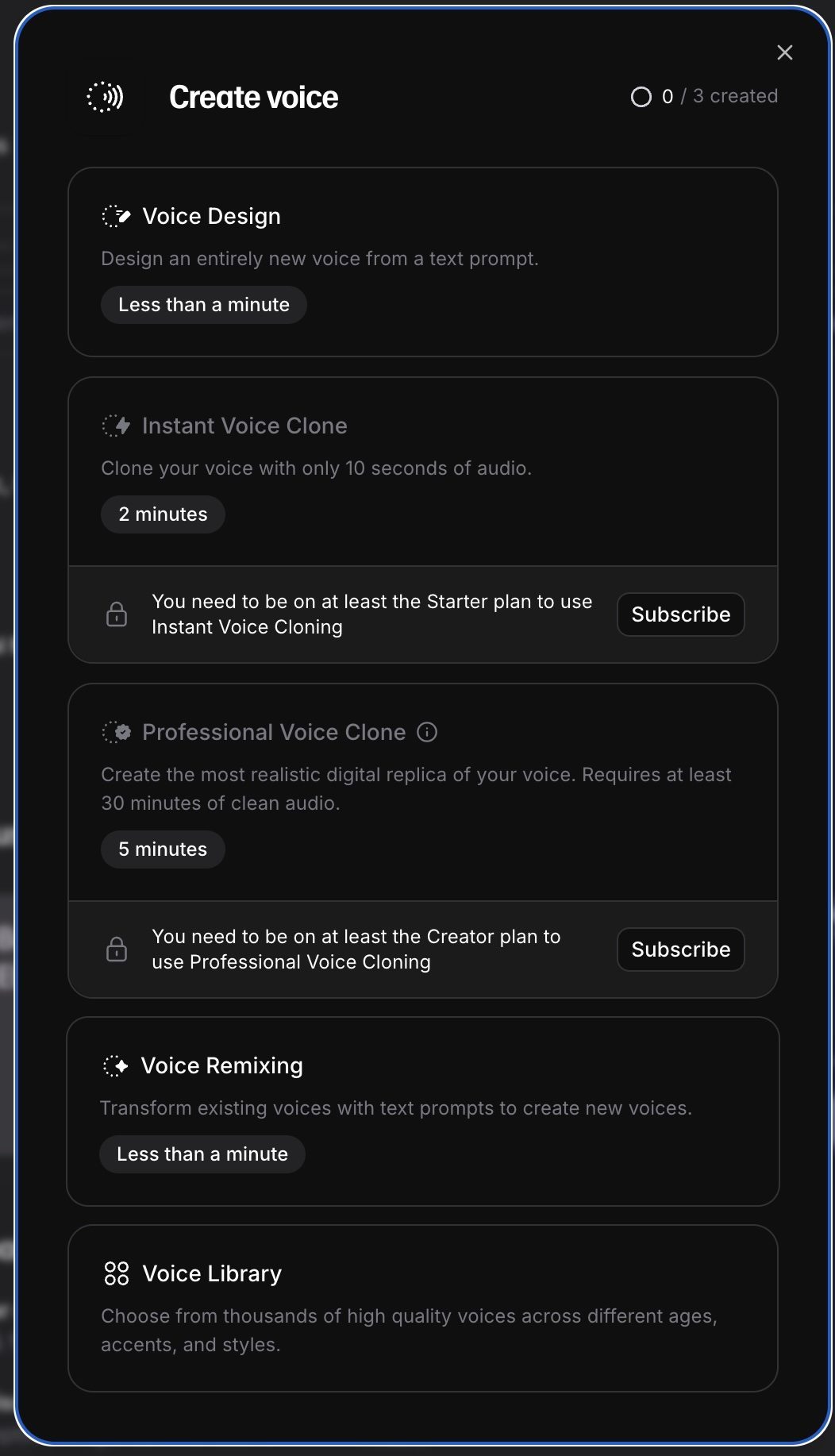
Back in the ElevenLabs dashboard, go to Voices, then click Add Voice, then choose Instant Voice Clone. This is the option we're using today — and the point in the flow where the free tier stops covering you. Instant Voice Cloning unlocks on the Starter plan ($5/month) and above. The upgrade is a few clicks from the billing settings, takes effect immediately, and you can cancel at any time.
Give the voice a name. Something like "Your Name - Narration" is useful if you think you might make more than one clone later (we'll get to why you might). Upload your audio file.
Before the clone is created, the platform will ask you to agree to a voice-ownership declaration. This is exactly what it sounds like: you're confirming that the voice you're uploading is your own, or that you have explicit permission from the person whose voice it is. We'll come back to this in the legal section because it matters more than it looks.
Agree, click Create, and wait about thirty seconds. That's it. You now have an AI model of your voice.
Step 4: Generate Your First Audio
Go to Text to Speech in the left-hand menu. At the top, switch the voice dropdown from the default voice to the one you just created. Paste in some text — anything, but ideally something you haven't read in the sample, because you want to hear the clone produce words it hasn't seen you say.
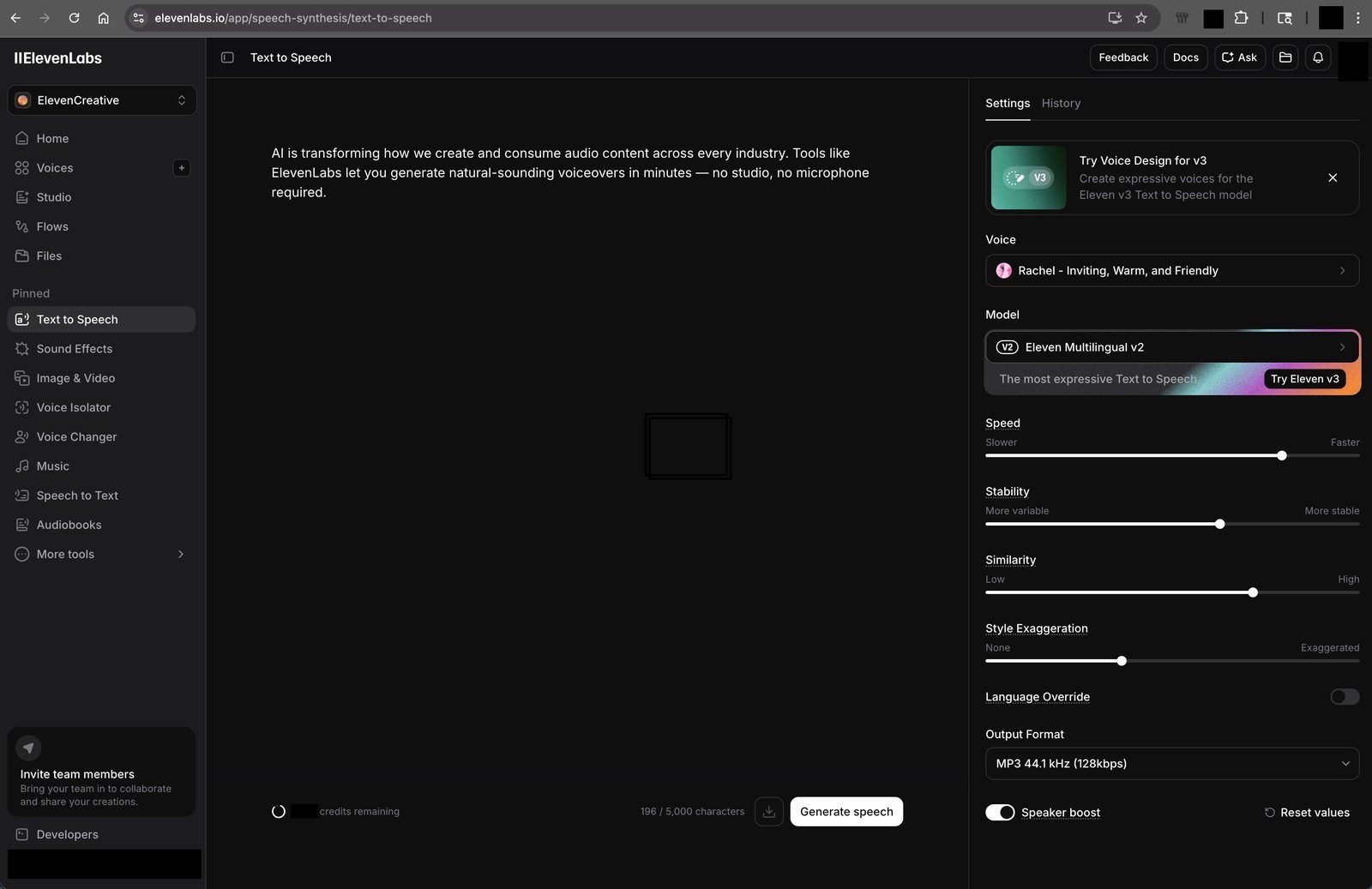
Press Generate. After a few seconds, you'll have an audio file. Play it.
This is the moment we described at the start. Expect to feel slightly odd. The voice will be recognisably yours. The inflections will be close, though not perfect. With a short sample, you'll probably notice one or two things — a pause that lands a beat off, an emphasis on the wrong word in a long sentence. With a better sample and more characters generated, these improve. But even on your first attempt, the result will be closer to you than you were expecting.
There are two sliders worth playing with: Stability and Similarity Boost. Stability controls how consistent the voice is from sentence to sentence — too low and the voice drifts into different emotional registers, too high and it flattens out. Similarity Boost controls how tightly the output matches your original sample versus allowing some variation. The default settings are reasonable. Move them around, regenerate a few times, and you'll quickly get a feel for what works for your voice.
There's a third slider — Style Exaggeration — that most tutorials don't mention. It amplifies whatever delivery tendencies your voice already has. If your clone sounds slightly flat or "sleepy" compared to how you actually speak, nudging Style Exaggeration up to around 3–5% often fixes it. Go higher and the output becomes unstable and over-performed. ElevenLabs themselves recommend keeping it at 0 by default — treat it as the dial you reach for only when the other two sliders aren't solving a flat delivery.
What You Actually Get at Each Tier (Honest Pricing)
This is where a lot of tutorials are misleading about ElevenLabs, so let's be specific.
Free ($0/month) gives you a test drive of the platform: roughly 10,000 characters of text-to-speech generation per month using the pre-built voice library. It does not include voice cloning. The free tier exists so you can evaluate the output quality before paying anything — paste a paragraph, pick a pre-built voice, listen to the result, decide whether continuing makes sense for you. Start here.
Starter ($5/month) is where Instant Voice Cloning unlocks. You get 30,000 characters of generation per month, up to 10 custom voices (including your clones), and the full range of voice settings. For a blogger narrating two or three articles a month, or anyone producing short-form audio regularly, this is comfortably the right tier and the one this tutorial assumes you'll move to once the recording sample is ready.
Creator ($22/month) brings 100,000 characters per month and unlocks Professional Voice Cloning — the tier for people producing regular long-form audio, or anyone wanting a noticeably more accurate clone built from 30 minutes or more of input. Most people we talk to who stick with this workflow settle on Creator within a few weeks.
Character count is input text, not audio duration. A 1,500-word article is roughly 8,000 characters. At Starter, that's three or four articles per month in audio form. At Creator, about twelve.
The practical sequence is almost always the same: sign up free, paste a paragraph into text-to-speech to confirm the platform sounds good to you, upgrade to Starter when you're ready to record your sample, then decide between Starter and Creator based on how much you actually use it in the first month.
You can test ElevenLabs on the free tier, then upgrade to Starter ($5/month) when you're ready for voice cloning.
The Legal and Ethical Part (Please Read This)
This is the section most tutorials skip. It is also the most important one, because the rules around voice cloning have tightened sharply over the last two years and the line between "creative tool" and "actively illegal" is not always obvious.
The short version: cloning your own voice is legal and ethical everywhere we're aware of. Cloning anyone else's voice without their explicit, documented consent is, in most jurisdictions, somewhere between legally risky and flat-out prohibited. Several U.S. states have passed laws criminalising the unauthorised use of someone's voice or likeness. The EU's AI Act includes specific obligations around synthetic voice content. And even where the law is still catching up, the platforms themselves — ElevenLabs included — ban unauthorised cloning in their terms of service.
This matters for a few practical reasons.
The voice-ownership declaration is not a formality. When you click through it during setup, you're making a legally binding statement. If you cloned someone else's voice, that statement is false, and the platform can — and does — terminate accounts, hand over information to authorities, and refer cases for prosecution where the harm is serious.
"I was just experimenting" is not a defence. Using a cloned voice to generate a realistic-sounding message from a family member, a politician, a celebrity, or anyone else can constitute fraud, defamation, or impersonation depending on context, regardless of your intent. This is true even if you don't publish it anywhere.
Consent needs to be explicit and specific. If you want to clone a friend's voice for a birthday project, great — but get it in writing, and be specific about how the voice will be used. "Verbal permission" is genuinely not enough if something later goes wrong.
There are some grey areas worth knowing about. Cloning the voice of a deceased relative, with family consent, for private memorial use is handled differently by different platforms — some allow it with documentation, some don't. Cloning a historical or public-domain voice for educational content is typically allowed but sits in a different category on most platforms and requires specific approval. If you're planning either, check the current platform policy before you upload anything.
For the overwhelming majority of people reading this, none of the complicated cases apply. You want to clone your own voice for your own projects. That's simple, legal, and exactly what these tools are built for. Proceed.
Five Real Projects to Try This Week
The whole point of having a cloned voice is using it, and people often get stuck on the "what would I even do with this" question once they have the tool set up. Here are five projects that take an afternoon and show you what the technology is actually for.
Narrate one of your old blog posts or newsletters. Pick a piece you wrote in the past year, paste it in, generate the audio, upload it to your podcast platform or embed it on the original post. For writers with existing archives, this is a low-cost way to add an audio format without any new writing.
Record a short audiobook sample. If you've ever thought about self-publishing an audiobook, cloning your own voice is now a realistic route. Record two to three minutes of a book you're working on, listen back, and decide whether this is a format you want to produce at scale. The sample costs you nothing.
Voice a small personal assistant or side project. If you're building anything that talks — a meditation app, a language-learning tool, a Twitch bot, a car satnav replacement — you can now give it your voice rather than a generic library voice. This is a distinctive touch that takes minutes rather than days.
Create a voice recording for family. Record a letter to your children, grandchildren, or anyone you care about. Use your clone to generate readings of your favourite stories, letters home, birthday messages set to generate years from now. This is one of the use cases people underestimate until they try it.
Dub your own content into another language. ElevenLabs supports dubbing in over 30 languages, and you can use your own cloned voice for the dubbed output. For anyone with an international audience, or anyone making language-learning content, this is a quietly transformational feature. If you're specifically comparing tools for this, our ElevenLabs vs Murf vs Descript comparison covers which platforms handle multilingual output best.
What to Do If the Clone Isn't Quite Right
First clones are rarely perfect. If the output sounds slightly off, the fix is almost always in the sample, not the settings.
If the voice sounds muffled or distant, re-record closer to the microphone in a smaller, softer room. If it sounds oddly emotionless, re-record with more varied tone and a longer passage. If specific words are consistently mispronounced, add those words to the sample — the model will pick them up. If pacing feels wrong, it's often a sign the original sample was read too formally; re-record more conversationally and the clone will follow.
You can delete and recreate a voice clone as many times as you want on the Starter plan and above. Treat the first few attempts as calibration. By the third sample most people are getting output they're happy with.
The Hour You're About to Save, For Years
Recording a short video monologue takes most people about thirty minutes by the time they've set up, recorded, re-recorded the stumbles, and edited. A 1,500-word article read aloud takes about ten minutes of actual reading and another ten of re-dos. If you produce this kind of content regularly, cloning your voice converts all of that into about twenty seconds of generation time per piece.
The first few uses feel faintly unreal. The hundredth use feels normal. And once it feels normal, you realise the thing you just automated was consuming a quietly significant amount of your week. That's the case for doing this, in the end — not the novelty, but the compounding time saved against something you were already doing by hand.
If you're new to AI tools more broadly and this is one of your first serious experiments with them, our beginner's guide to AI covers the broader landscape and the mindset shifts worth making. Voice cloning is one of the more viscerally impressive things the tools can do, but it's only one of them.
🎙️ Try ElevenLabs Free
Sign up free to test quality. Voice cloning requires the Starter plan at $5/month.
Start Free on ElevenLabs →Ten minutes, a quiet room, and a short passage you actually care about reading. That's all it takes to hear yourself in a way almost no one had access to a few years ago. Whatever you do with it from there is up to you — but the setup, at least, is genuinely this simple.